Legal work doesn’t arrive in neat, isolated tasks. For general counsel, legal ops leaders, and paralegal managers, the day is often filled with contract reviews, internal requests, shifting deadlines, document updates, and constant follow-ups just to understand what’s moving and what’s stuck. Here, timelines can easily get lost across emails, trackers, and separate tools.
Many legal project management tools were built to organize this work, but teams still feel friction when drafts move into approvals, approvals move toward signatures, or responsibilities shift across departments, with these handoffs taking about 3.4 weeks on average.
So keeping legal work progressing requires more than tracking tasks; it requires workflows that stay connected from start to finish.
Aline approaches this problem differently. Instead of splitting contract work across multiple tools, it keeps drafting, redlining, approvals, signing, and post-signature tracking within the same workflow. By managing the entire process in one place, it reduces the handoffs and coordination gaps that often slow contracts down.
In this guide, we compare the best legal project management tools designed to improve efficiency, coordination, and visibility across modern legal work, and we’ll also see how Aline differs with its comprehensive approach.
When evaluating corporate legal project management tools, the goal is to find the right platform that solves operational bottlenecks that slow down legal work, approvals, and cross-department collaboration. Use this checklist to assess whether a tool actually supports real legal operations.
Legal teams often struggle to keep work moving between drafting, approvals, and execution. In fact, 56% of legal teams take a week or more to close even routine contracts, with some taking over 15 days for standard agreements.
A strong platform should:
Administrative coordination is one of the biggest drains on legal productivity. In-house counsel spend 25–40% of their working hours on non-legal administrative tasks, and 83% of in-house legal leaders report that manual administrative work prevents them from focusing on strategic work.
Look for tools that:
Traditional tools often improve visibility but don’t fix delays between stages. Only 11% of companies consider their contract processes very effective, and contracts can take 3–4 weeks to finalize, slowing revenue recognition.
A good solution should:
Today’s legal work is cross-functional. Teams using AI-powered contract tools experience a 22% reduction in negotiation time and spend significantly less effort on pre-negotiation preparation.
The right platform should:
Using this checklist as a baseline makes it easier to assess which legal project management tools can support real operational efficiency, not just surface-level organization.
Whether you’re a general counsel looking for clearer oversight, a legal operations leader focused on reducing workflow delays, or a paralegal manager trying to keep tasks organized without losing track of versions, the following are the platforms worth considering.
How does Aline differ from traditional legal project management tools?
Most legal project management tools focus on task tracking for legal work. CLM platforms typically focus on storing executed contracts, while newer AI tools help with drafting or redlining during review.
What they rarely do is connect these stages into a single workflow. Contracts may be reviewed in one system, routed for approvals in another, signed through a separate platform, and then stored elsewhere for recordkeeping.
Aline is built to close that gap. Instead of treating contracts as isolated tasks or static documents, it links drafting, collaboration, approvals, execution, storage, and post-signature obligation tracking in one continuous workflow.
This difference becomes clear when work moves between teams. Delays rarely happen because teams lack task lists; they happen when ownership shifts, approvals stall, or execution steps live across separate tools.
Teams using Aline’s connected workflow report reviewing contracts up to 10x faster and reducing turnaround times by 50–75%, showing how fewer handoffs directly impact speed.
Playbook-driven redlining further accelerates reviews by 50–75%, reducing manual coordination across stakeholders.
By bringing those stages into a single, connected workflow, Aline helps turn contract management from a coordination challenge into a more structured, predictable process.
Aline is an AI-powered contract management platform created for in-house legal teams, legal operations professionals, and organizations handling high volumes of agreements that need clearer ownership and faster contract workflows.

Contract cycles often slow down once drafts move through multiple stakeholders, approvals sit in inboxes, and version changes happen across disconnected tools. For large firms handling 350+ contracts, the process can take up to 18% of the total sales cycle, meaning delays during review and approval directly affect business timelines.
Aline brings contract workflows into a single connected environment, enabling legal teams to manage drafting, negotiation, approvals, and execution without relying on disconnected systems.
By centralizing ownership and workflow stages, it helps accelerate turnaround times and reduce coordination overhead, while allowing teams to analyze 10,000s agreements in real time and reclaim up to $30K in annual savings.
Aline helps you move contracts forward without switching between document versions, tracking updates across email threads, or waiting on manual follow-ups to understand progress, creating a more structured and predictable approach to managing legal work.
Also, Aline AI plays a big role in keeping your process steady. Drafts come together in minutes, reviews feel more consistent, and approvals move through a clear path that helps you keep things moving.
In other words, it takes a lot of pressure off the parts of contract work that usually drain your time.
By consolidating everyday coordination into one system, legal teams can reduce reliance on outside counsel for routine work. This has helped teams save up to $60K annually and 20+ hours each week that would otherwise be spent on manual follow-ups and tracking.
If you want an all-in-one solution that supports your workload without adding complications, Aline delivers a blend of workflow automation, structure, and clarity that fits naturally into everyday contract workflows.
“Aline is like having a lawyer on call for redlining. It’s incredibly valuable. The ability to use AI to draft new documents instantly, analyze legal language, and redline contracts brought unmatched speed and accuracy.” - Collin Clifford, Head of Legal, Superhuman.
“It’s very expensive for outside counsel… having them double check something costs as much as drafting 10 contracts in Aline” - Mike Quattorchi, CEO, WarehouseNow.
By keeping execution inside the same workflow, teams can reduce signing delays by 20–30% and cut manual document handling by 40–50%, helping agreements move forward while maintaining compliance.
“Aline’s reporting has been a game-changer for us. It gives our legal team an immediate, dependable source of truth across every contract, letting us surface critical obligations and risk details in minutes instead of weeks of manual review.” - Jamie Emmerich, Senior Corporate Paralegal, DailyPay.
Legal teams don’t usually struggle because contracts are difficult to draft. Challenges often appear once collaboration begins, approvals expand across departments, and ownership becomes unclear. Bringing contract workflows into one system changes how work moves across the business.
Leveraging Aline helps:
When workflows, ownership, and approvals live in one environment, agreements spend less time waiting between stages. Teams using connected workflows report a 40% improvement in turnaround time, helping deals progress without prolonged handoffs.
AI-assisted drafting and playbook-driven reviews reduce manual editing and back-and-forth between stakeholders. With reviews happening up to 5-10x faster, legal can focus more on negotiation strategy and risk decisions instead of administrative follow-ups.
Shared visibility into contract status eliminates version confusion and reduces dependency on email updates. With centralized reporting and ownership tracking, teams can analyze thousands of agreements in real time and maintain a clearer view of timelines and responsibilities.
AI-powered reporting and centralized repositories provide a structured source of truth, helping organizations reclaim up to $60K annually by reducing reliance on external counsel and improving internal efficiency.
See how teams review contracts faster and reduce up to $40K in spend by replacing multiple disconnected tools. Book a personalized Aline demo today.
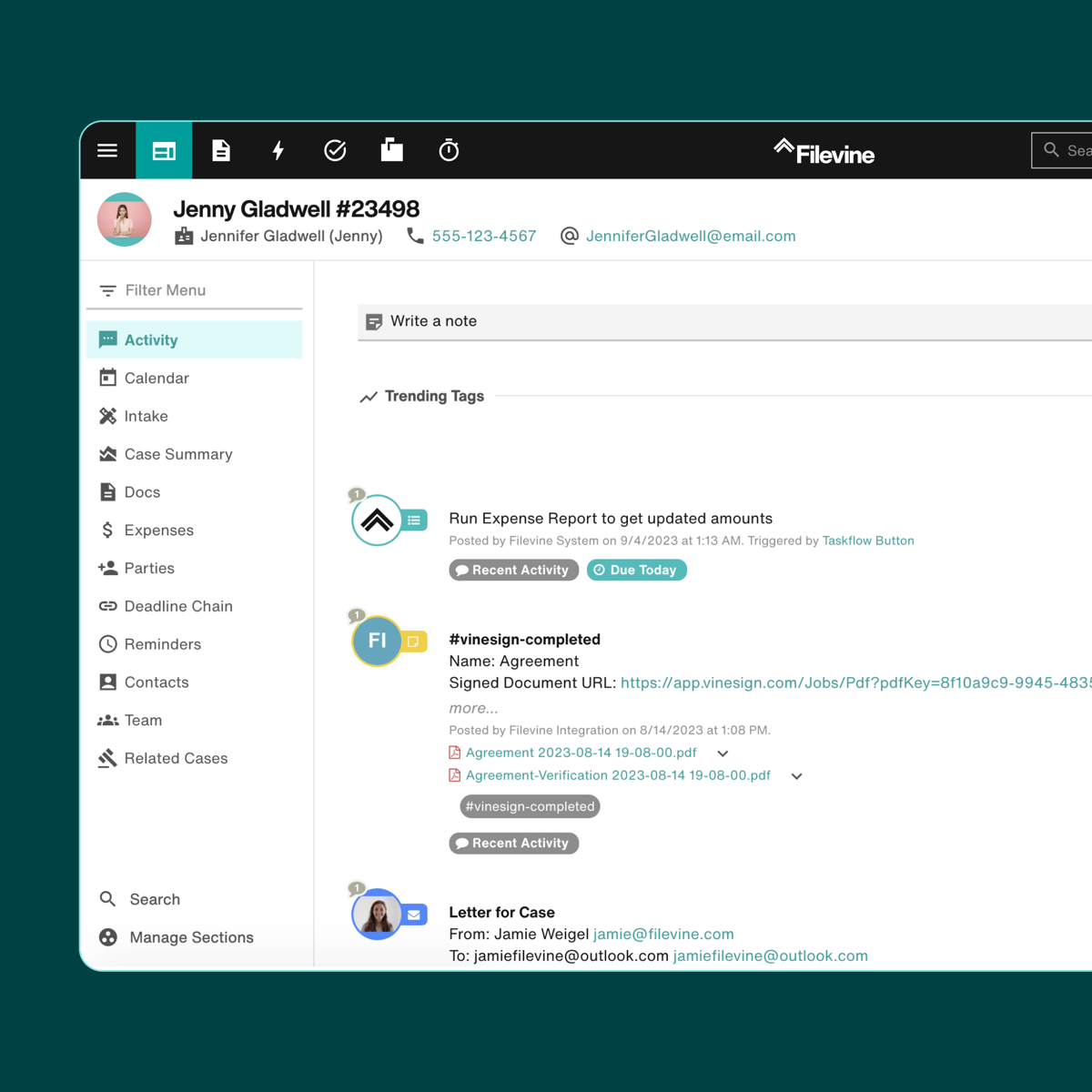
Filevine is a litigation management platform built for teams that handle cases with constant movement and a heavy flow of legal documents.
Source: G2
Court deadlines, discovery exchanges, and client updates can pile up quickly, and having one place to track everything makes the work far easier to manage.
The platform helps you turn case details into actionable tasks, which, in turn, can give you a clear view of what needs attention and who’s responsible for each step.
Additionally, you can rely on Filevine when your matters involve multiple people touching the same information. Updates stay in one place, documents stay organized, and timelines stay visible so the entire team can move together while keeping context intact.
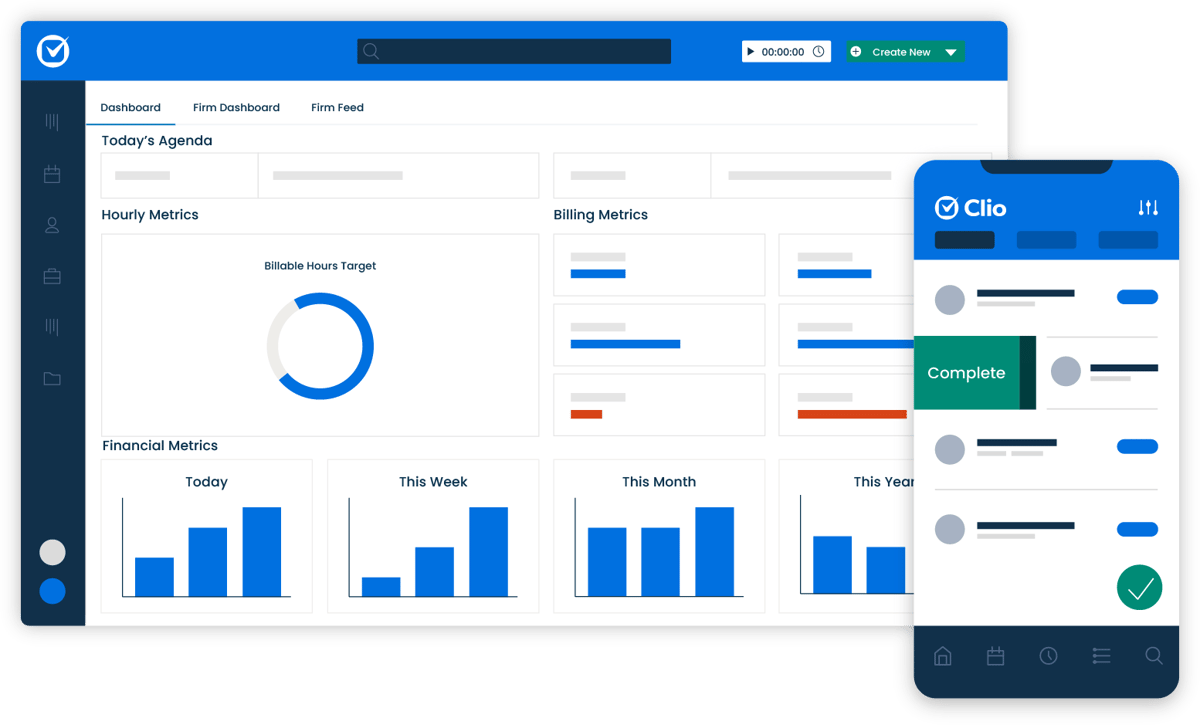
Clio is a legal practice management software platform that helps you keep every matter organized from the moment a client reaches out.
Source: G2
If you want a clear home base for tasks, documents, communication, and billing, Clio gives you a setup that feels easy to maintain even during busy stretches.
You can open a matter and see everything tied to it in seconds, which takes a lot of pressure off the daily shuffle of tracking details across multiple places.
What stands out is how Clio supports the natural flow of a legal practice. You can build custom workflows for your routine case types, track your time as you work, send invoices without fuss, and share documents securely with clients or colleagues.
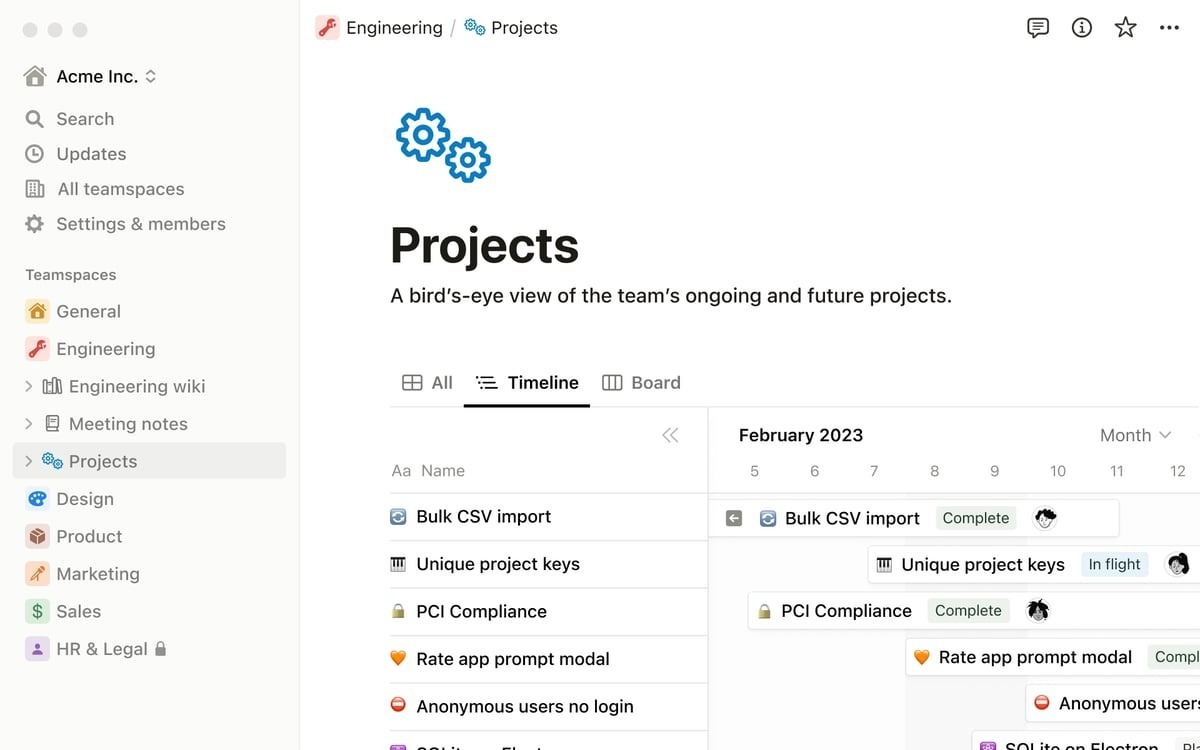
Notion is a flexible project management software platform that brings legal teams and other departments into one shared workspace.
Collaboration tends to feel smoother when everyone contributes to the same pages, dashboards, and task lists, and Notion makes that easy to maintain.
Source: G2
For example, a legal project manager can map out complex projects, assign work, track deadlines, and organize legal documents alongside contributions from HR, finance, operations, or any other group involved.
The tool works especially well for projects that don’t fit neatly into traditional case systems. Pages are customizable, task tracking can take any format you prefer, and updates appear in real time.
Overall, Notion behaves like general project management software, but it adapts quickly to the structure your team needs, which helps people stay on the same page from start to finish.
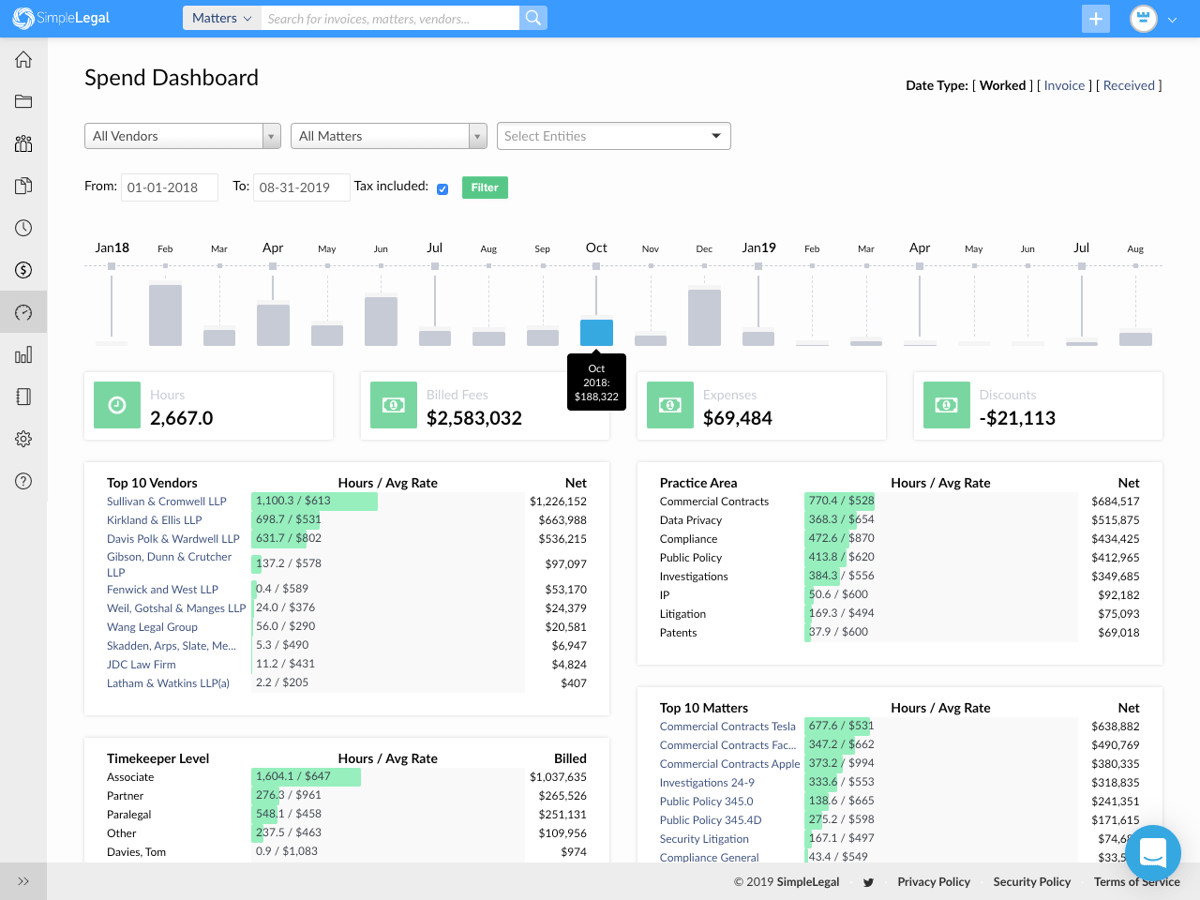
SimpleLegal is a platform that gives legal teams a clear view of their spending, from day-to-day expenses to invoices for services rendered.
Many groups rely on it when they want tighter control over budgets, cleaner expense tracking, and a better handle on how outside work is billed.
Source: G2
Everything related to legal spend sits in one organized system. This simple feature makes it easier to compare costs, review payment details, and keep financial information aligned with your broader legal operations.
The platform also supports consistent collaboration with vendors and outside counsel. Invoices arrive with status updates you can review at a glance, and payment processing becomes more predictable thanks to built-in workflows.
Plus, SimpleLegal pairs these tools with bank-grade security and smooth integrations with accounting software, giving legal teams a financial hub that’s both safe and easy to operate.
It leans toward legal-specific tools rather than general finance software, so the setup already fits the way most legal departments manage money.
LexisNexis is a research platform built for legal work that depends on accurate information and deep source material.
Source: LexisNexis.com
It’s widely used for pulling statutes, case law, commentary, and secondary references into one place, which helps you build stronger arguments without scattered research files.
Everything loads quickly, searches run with precision, and you get the kind of detail that supports solid legal briefs and informed decision-making.
The platform also makes it easier to stay organized as your research grows. Notes, saved searches, and collected sources can all live in structured folders, so you can return to your work without retracing your steps.
Agiloft is a legal management software solution designed for legal departments that run large, complex operations across many business units.
Enterprise teams often need legal technology that can handle high-volume work, custom processes, and detailed oversight, and Agiloft fits that environment well.

Source: G2
The platform gives you a structured way to manage contracts, approvals, data, and internal requests while keeping legal processes consistent across the organization.
What sets Agiloft apart is its depth. The system comes with advanced features that support everything from contract workflows to internal service requests, and it can scale as operations grow.
Dashboards convert contract and matter data into insights you can use for business performance reviews, and the level of configurability makes it easier for teams to shape the platform around how they already work.
Legal projects rarely slow down because teams lack software. They slow down when work depends on individual task tracking instead of a consistent operational flow.
Each tool on this list strengthens a specific layer of legal operations. Some help teams research faster. Others improve budgeting or matter visibility. But the bigger question is not which feature solves one task. It is how you want legal work to move across the entire lifecycle.
This is where Aline’s differentiation becomes clearer. Rather than focusing only on accelerating isolated tasks, it turns contracting into a repeatable operational system built on structured playbooks.
Aline gives you value predictability (more than the speed). Teams gain a workflow that carries work forward with fewer decision challenges and less reliance on ad hoc coordination.
As legal teams mature, the evaluation criteria shift from feature depth to operational clarity. The strongest platform is not simply the one that helps the legal team work faster. It is the one that makes legal work run in a way that feels organized, scalable, and reliable over time.

Aline centralizes the full contract lifecycle into a single workflow, allowing teams to manage drafting, collaboration, approvals, signing, and tracking without relying on multiple disconnected tools.
By optimizing coordination and ownership, organizations can achieve:
Start your free Aline trial today and reduce your next round of contract redlines by up to 75% with AI Playbooks.
The best option depends on the type of legal work you handle. Tools like Aline, Clio, Filevine, and Notion all support different parts of the legal sector. Contract-heavy teams often choose Aline, while firms focused on litigation or daily matter tracking may prefer Filevine or Clio. Notion works well for cross-department collaboration. A good starting point is identifying which key features matter most for your workflow and client service goals.
Legal project management is the practice of organizing, planning, and managing tasks across legal matters or projects. It helps you assign tasks, track progress, control timelines, and communicate clearly with your team or clients. Firms use it to improve client outcomes and create predictable processes around everything from research to drafting to case preparation.
General project management software solutions like Notion, Asana, and Monday are popular across many industries, including the legal industry. Law-specific platforms such as Clio and Filevine offer additional structure tailored to managing tasks, client data, documents, and legal workflows.
These tools bring more clarity and consistency to your work. You can stay organized, respond faster, keep client communication cleaner, and streamline processes that normally slow down client management. Even small law firms see value because predictable systems often lead to better client outcomes.
There’s no single answer, but the best legal project management tools are the ones that match your priorities: document organization, billing, research, collaboration, or contract work. Many firms adopt a mix of legal software depending on their needs, though Aline, Clio, and Filevine tend to be top picks for managing tasks and maintaining structure across the best legal project management workflows.











