Contract management has a way of slowing everything down. For most people, this friction comes from how contracts are organized, or, more often, how they’re not.
Why? Because manual tagging and folder systems only work for so long before the volume overwhelms the process.
Luckily, AI auto-tagging now offers a different approach. By reading contracts and applying tags automatically, it turns a messy archive into something you can actually use. Parties, dates, and contract types are identified in seconds, and the files become easily searchable.
In this guide, we’ll look at how auto-tagging works and why it’s changing the way teams handle contracts.
AI auto-tagging uses artificial intelligence and machine learning to add relevant labels to files, documents, images, and audio and video files automatically.
With manual tagging, someone has to open each file, review the content, and choose the right labels. Automated tagging lets an AI system handle that work much faster.
The process usually works like this:
For example, in digital asset management, AI tagging might label an image with “logo,” “team,” or “event.” For audio and video files, it can tag speakers, topics, or scenes.
In contract management, it might label an agreement as “NDA,” “Vendor Agreement,” or “Expires in 60 Days.”
The technology comes from machine learning models trained to recognize patterns. As those models process more content, they get better at predicting which tags are useful.
Keeping contracts organized is unnecessarily difficult if you’re stuck with manual tagging. AI auto-tagging does the tagging for you, so files are easier to find and manage.
Let’s look at where it really makes a difference in contract management.
This is one of the most useful benefits of AI auto-tagging. AI-powered systems with AI cognitive engines scan a contract’s text content, understand its natural language, and pick up specific details like parties, dates, and contract types.
As mentioned earlier, the AI then applies relevant tags and sorts each document into the right categories automatically.
And with contracts neatly tagged, searching becomes effortless. You can type a vendor name, a contract type, or even a keyword from the agreement, and the right files appear instantly. Compared to manual tagging, this method saves hours of time.
But fast contract retrieval doesn’t just save time, it keeps workflows moving. Teams can respond to requests, handle audits, and review agreements for renewals without delays. For any business managing a growing contract library, this feature quickly becomes a must-have in daily operations.
If your team wants this kind of efficiency without the manual effort, Aline’s AI Repository makes it easy to find any contract in seconds.
Keeping up with contract deadlines is one of the hardest parts of contract management. When everything depends on manual tagging, it’s easy to miss a renewal date or overlook a termination window.
With AI auto-tagging, contracts are scanned for specific information like start dates, expiration dates, and renewal terms. They’re then correctly tagged, so they’re ready to track without any extra work.
Once the tags are in place, users can quickly find contracts that need attention, which avoids time-consuming searches and lowers the risk of missed deadlines.
Simply speaking, AI makes handling contract timelines much easier by providing:
By surfacing key dates automatically, AI gives teams a clear view of upcoming deadlines without the constant back-and-forth of manual checks.
Different contracts serve different purposes, and knowing which is which can save a lot of time. Vendor agreements, NDAs, employment contracts, and sales deals all carry different requirements.
If you manually tag these files, there’s always a chance something gets mislabeled, skipped, or named differently from one folder to the next. That creates extra manual work whenever you need to find or review a specific contract.
AI auto-tagging sorts contracts by type automatically. It looks at the context of the document to determine what kind of contract it is, then applies AI-generated tags based on what it finds. With accurate tags that stay consistent, your contract library becomes easier to browse without opening every file first.
This setup makes it easier to focus on important topics, like which agreements are pending approval or which ones need review for compliance. The AI has already grouped the files, so you can pull up the right category much faster.
Some practical benefits include:
Audits and compliance checks move faster when the right contract details are easy to find. Teams often need to review agreements, confirm dates, and verify clauses, which can take longer when files are buried in folders, mislabeled, or full of avoidable errors.
AI auto-tagging helps clean up that process. It scans legal documents to identify key data like effective dates, parties involved, renewal terms, governing clauses, and contract types. Then it places those details into searchable categories, which supports better accuracy and consistency during review.
Human review still has a place, especially for legal judgment and final confirmation. The difference is that reviewers can start with a cleaner, better-organized contract library rather than opening one document after another just to find the right file.
For example, if the legal department needs every vendor contract signed in the past year, they can filter the library by contract type and date, then pull the results in seconds. That makes audit prep much easier without forcing the team to rely on folder names or memory.
With contracts already tagged and easier to search, planned reviews, internal checks, and regulatory updates become much easier to handle.
AI auto-tagging helps your team work together with less friction.
Contract lifecycle management now involves more than one department. Legal, sales, finance, and operations often touch the same agreement, so collaboration can slow down when files are hard to find or poorly labeled.
With AI auto-tagging, you can keep every document correctly tagged and instantly searchable. The process becomes more reliable because everyone can find the same contract, view the right details, and trust that the file is labeled properly.
It also helps as your contract volume starts to scale. A small folder system might work for a few agreements, but growing teams need a better way to keep contracts organized without adding more manual work.
You’ll also have a clearer view of the most current title and version of each contract, so nobody works from outdated documents. Teams can leave notes, check status, or mark a file as ready for review, which makes the next step easier to spot.
When files are organized and easy to find, contract collaboration feels lighter. Your team can move faster, make decisions sooner, and spend less time chasing documents.
The Aline AI Repository takes AI auto-tagging to another level by turning your contracts into a fully searchable, organized database. With this tool, your agreements are automatically tagged, categorized, and connected to actionable insights.
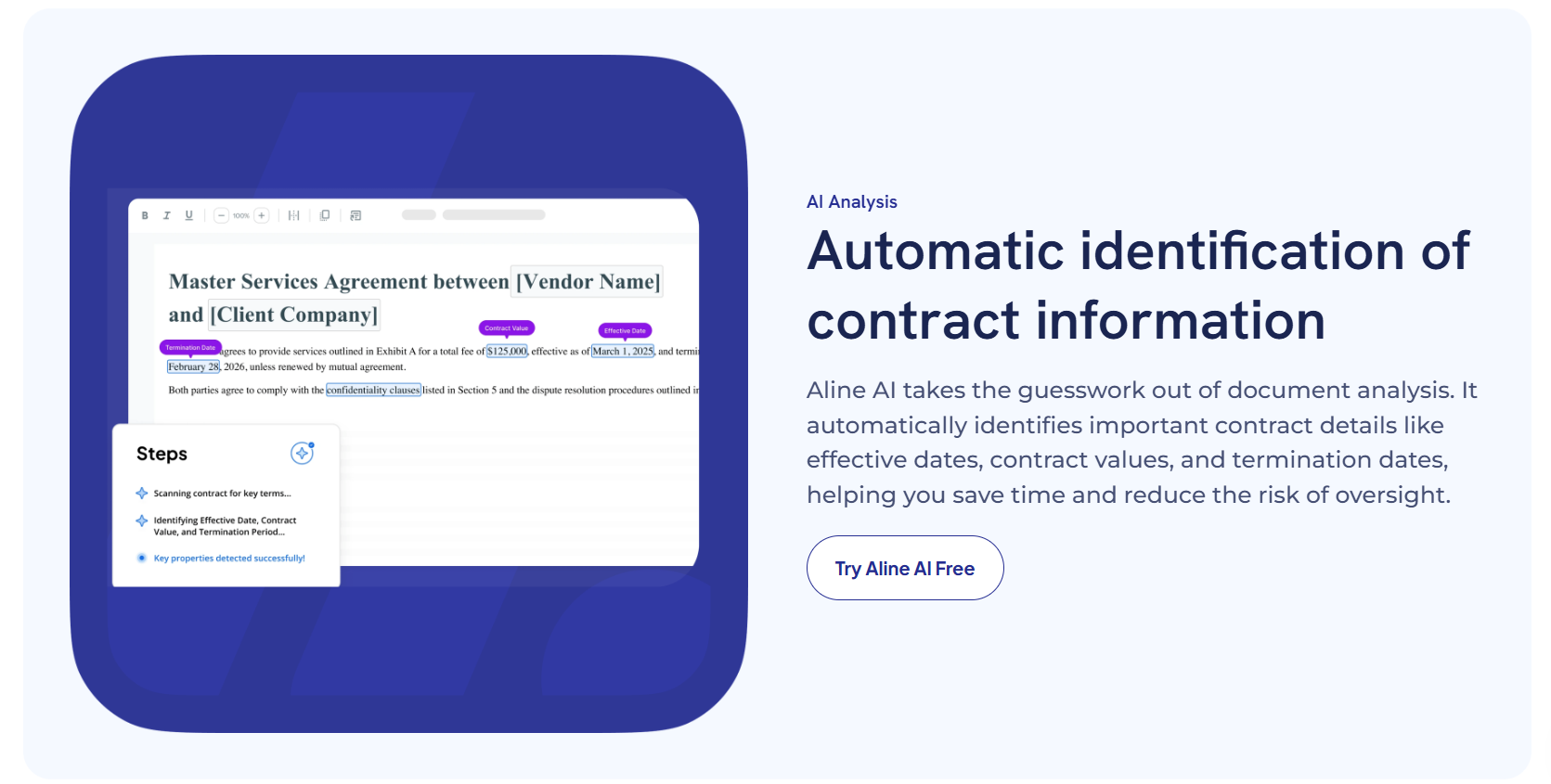
Here’s how it works:
By combining auto-tagging with deep contract insights, Aline lets you leverage AI to manage thousands of agreements with confidence. Plus, your team can run custom reports, export contract data, and keep every project in motion.
If you want faster organization, simpler searches, and more accurate tracking, the AI Repository makes managing contracts both effortless and scalable.
Keeping track of contracts without the right system is a lot like trying to find one file in a messy desk drawer. You eventually get it, but not without wasting time and patience.
AI auto-tagging changes that by making every agreement instantly searchable and ready when you need it.

Aline’s AI Repository takes that idea further. It handles tagging, search, and reminders behind the scenes, so your team can focus on moving projects forward instead of organizing files.
No digging through folders or second-guessing which version is current. You just type what you need, and it’s there.
If you’re ready to leave the “messy desk” approach behind, start a trial of Aline and see how much smoother contract management can be when your system keeps everything in order for you.
AI auto-tagging automatically labels files or documents using AI. It’s common in image tagging, video, and audio to identify images or speakers during the tagging process. For contracts, it scans agreements for names, dates, and renewal terms, then adds relevant tags so you spend less time on manual tagging.
AI tags are labels generated by AI tagging tools. In media assets, they can describe objects in images or speakers in audio to support future content. For contracts, tags like “NDA” or “Expires in 30 Days” let teams filter and access the right agreements quickly.
New files are scanned and tagged instantly. Contracts are filed into categories, linked to key dates, and given metadata tags that make search easier. This organization works well for contracts and for digital asset management with large media files.
It cuts repetitive work and reduces mistakes. AI spots specific information in contracts and applies tags automatically, so your library stays accurate and searchable without the usual manual effort.
AI tagging classifies existing content by contract type, parties, and key deadlines. Teams can find agreements faster, prepare for audits, and keep workflows moving without rifling through folders.
In digital asset management, AI can identify images, apply tags to media assets, and handle speaker recognition in audio or video. It can also help teams adapt content for a blog post, campaign, or marketing project by making large libraries easier to search and reuse.