You already handle a lot of moving parts in your contract work, so having one place that shows what’s going on makes the whole process feel a lot more manageable.
A contract management dashboard does exactly that. It gives you a clear snapshot of your agreements, the tasks tied to them, and the deadlines you can’t afford to miss.
In this article, we’ll walk through what a dashboard actually does, the functions that matter most, the metrics you should be watching, and the features that make the whole experience feel smoother.
A contract management dashboard gives you a clear view of what’s happening across your contract management processes.
Basically, it brings your key performance indicators into one place so you can monitor contract status, track activity, and stay ahead of deadlines without relying on disjointed systems.
Every CLM tool presents its dashboard differently, but the goal is usually the same. The common denominator is visibility into active agreements, cycle times, upcoming renewals, and tasks waiting for review.
The overview a dashboard provides can help you understand how work moves across your workflow and where attention is needed.
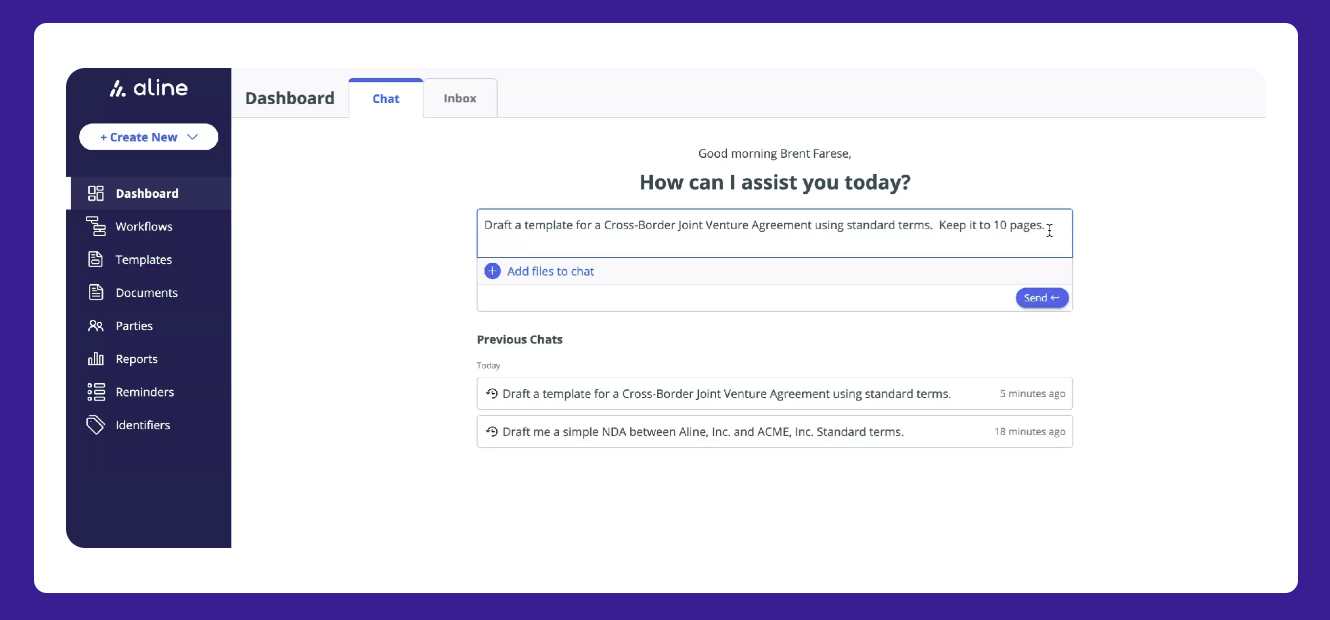
Aline’s dashboard follows that same principle but adds an AI-focused layout. You can ask the system to draft contracts, review language, or generate templates directly from the chat panel.
Overall, a strong dashboard makes contract management software feel lighter and way more organized.
Book a demo to see Aline’s dashboard in action.
A contract management dashboard gives you a clear, reliable way to follow your contract processes throughout their entirety. It keeps contract progress easy to scan, shows critical contract data at a glance, and helps your legal team and other stakeholders stay aligned.
The need for this kind of visibility is real. Weshare notes that only 22% of companies feel confident in the tracking and managing of their contracts. With so much at stake, a strong dashboard becomes one of the most important parts of how you manage contracts day to day.
A dashboard shows how each agreement moves through your contracting process. You see who’s reviewing it, what’s pending, and what needs to happen next.
This applies to internal or external stakeholders, and it helps prevent the slowdowns that usually come from missing information.
With the full picture available, it’s easier to keep contractual obligations on track and monitor contract performance without constant check-ins or reminders.
Dashboards pull the details that matter most into one place. You’ll typically see:
These points make it easier for teams to manage contracts with confidence. Nothing gets buried, and important dates or responsibilities stay visible for everyone involved.
Alignment becomes much easier when everyone shares the same view. Aline’s dashboard is a good example: the left-hand panel gives quick access to workflows, templates, reminders, and reports, while the main screen shows current drafting activity and recent requests.
If someone drafts a new agreement, reviews a clause, or asks the AI legal assistant to prepare a template, the activity appears immediately.
This keeps your legal team and business teams in sync, reduces back-and-forth updates, and gives each stakeholder a clear understanding of what’s moving and what needs attention next.
A good contract management dashboard should make your day feel easier. You get a quick view of the following:
A reliable dashboard shows how many contracts are currently in play. You’ll see active contracts, new contract requests, and the stage each one sits in. This way, you can understand workload across the team and stay organized from contract initiation through final signoff.
When the flow of incoming requests is visible, it’s easier to sort priorities and support internal or external stakeholders without guesswork.
Cycle time is one of the most important indicators of efficiency. A dashboard that tracks contract lifecycle time shows where agreements move smoothly and where they slow down.
You can check:
Such a level of visibility helps you refine your contract management workflow and avoid delays that stack up silently.
Renewal dates and contract expiry deadlines should always be easy to see on your dashboard. When these critical dates stay visible, it becomes much easier to avoid missed deadlines and stay in control of recurring agreements.
A good contract management dashboard shows what’s coming up and how soon you need to act. This keeps your team ahead of the timeline and reduces last-minute stress that can lead to rushed decisions.
Most dashboards highlight:
Clear visibility into these points helps you stay proactive and gives internal or external stakeholders the time they need to plan their next steps.
Some dashboards surface important contract terms so you don’t have to open each document to find the details you need. This helps you move faster during contract reviews, answer questions with more confidence, and keep context clear when several agreements are active at once.
These highlights give your team a quick snapshot of the information that usually shapes decisions or triggers next steps.
Examples of key details often shown include:
A contract dashboard should also give you a clear sense of the dollars involved. Seeing totals for each agreement, upcoming revenue tied to renewals, and high-value contracts moving through the pipeline helps teams understand where to focus their attention.
Financial visibility also supports better planning, whether you’re preparing for contract negotiation or reviewing long-term commitments.
When contract value sits alongside other key details, legal teams and business partners can make decisions with more context and spot opportunities or risks much earlier.
You should always be able to see which approvals are waiting, who owns them, and how long they’ve been stuck. A clear view of pending tasks reduces back-and-forth communication and helps avoid bottlenecks that slow deals or vendor contracts.
With these steps visible, it’s easier to follow up, reassign tasks, or step in when an agreement needs extra momentum.
A strong contract management dashboard should feel easy to use from the moment you open it. You want real-time insights, clear visibility into your contract work, and a setup that helps contract managers stay organized without too many tools.
Keep in mind that the goal is a centralized platform that keeps everyone aligned, supports compliance needs, and helps your team make data-driven decisions with less effort.
Here are the features that make the biggest difference:
You already see how helpful a dashboard can be for keeping contract work organized, but legal AI takes that visibility a step further.
For one, it helps you understand what’s happening across all the contracts managed by your team without digging through individual documents or guessing which agreement needs attention next.
You get a clearer view of total contract value, upcoming work, and patterns that might influence your decisions, which reduces the chances of missed opportunities or costly mistakes.
AI also makes it easier to understand contract types and spot terms that could create risk. It can flag unusual language, highlight delays in your workflow, or point out sections that need review.
Aline uses this approach by turning recent activity into quick summaries and showing insights that help you stay ahead of slowdowns. Seeing those details directly on the dashboard gives you context without opening multiple files.
Some contract management systems build on this by predicting which agreements may stall or suggesting helpful next steps based on past behavior.
These insights support better decisions, help you respond to evolving business needs, and make your dashboard feel like a smarter, more supportive part of your contract routine.
A good dashboard should help you breathe a little easier. It should clear the noise, show you what’s moving, and make the next step obvious.

That’s the experience Aline aims to give you: a simple, steady view of your contract workload that helps you maintain control without slowing down your day.
You get a space where details line up neatly, progress is easy to follow, and decisions feel more straightforward.
If you’re ready to manage contracts with less friction and more clarity, you can explore the platform yourself.
A dashboard gathers contract activity, deadlines, and documents in one view so you can easily track progress across your contract workflow. It brings together expiration dates, supporting documents, and task ownership, giving relevant stakeholders a shared picture of what’s moving and what needs attention. This helps you identify bottlenecks, improve user adoption, and stay aligned as agreements move through each step.
Dashboards generally fall into four groups: operational, analytical, strategic, and tactical. In contract management, these views help you review daily activity, surface key insights, support planning, and monitor how long contracts take. Together, they offer a structure that helps teams stay on the same page while meeting evolving business needs.
The process usually includes creation, review, negotiation, approval, signing, and post-signing management. Each stage plays a role in helping you ensure compliance, prepare for contract renewals, and monitor key benefits tied to obligations or performance. Clear visibility across these steps helps mitigate risks and avoid missed tasks.
CMS tools focus on storing and organizing documents, while CLM platforms manage the full lifecycle from drafting to renewal. CLM systems often support sales teams, legal compliance needs, and planning around regulatory requirements. They also give organizations actionable insights that help reduce errors and keep contracts moving without delays.











