If you're a General Counsel, Legal Operations Manager, Procurement Lead, or Revenue Operations leader, you're probably evaluating Juro and DocuSign CLM because:
While both platforms aim to solve these challenges, users continue to report gaps that affect day-to-day adoption.
Juro
"It is really poorly designed, very hard to navigate, and not intuitive whatsoever." — G2
DocuSign CLM
"The cost is high, the learning curve is steep, and the implementation feels complex and time-consuming." — G2
Addressing these gaps is important as poor contract processes have a measurable business impact. In fact, 15% of large organizations incur losses due to contract mismanagement.
For legal teams, the challenge isn't simply finding a CLM with the longest feature list. A platform that is difficult to navigate can discourage adoption across business teams. A platform that requires significant time and resources to implement can delay the value organizations expect from their CLM investment. As contract volumes increase, these challenges often become more visible.
Aline addresses these risks with a platform designed for quick implementation and faster adoption. It combines AI-powered contract review, workflow automation, repository management, and e-signatures in a single workspace for legal and business teams.
This article compares the core capabilities of Juro and DocuSign CLM, highlights the challenges users commonly report, and shows how Aline addresses those gaps.
Juro is a contract management platform for companies looking for a simpler way to create, approve, sign, and manage contracts. It is commonly adopted by businesses that need more structure and visibility than spreadsheets and email chains can provide.
It also works for companies with lean legal teams that need business-led contract creation and collaborative workflows.
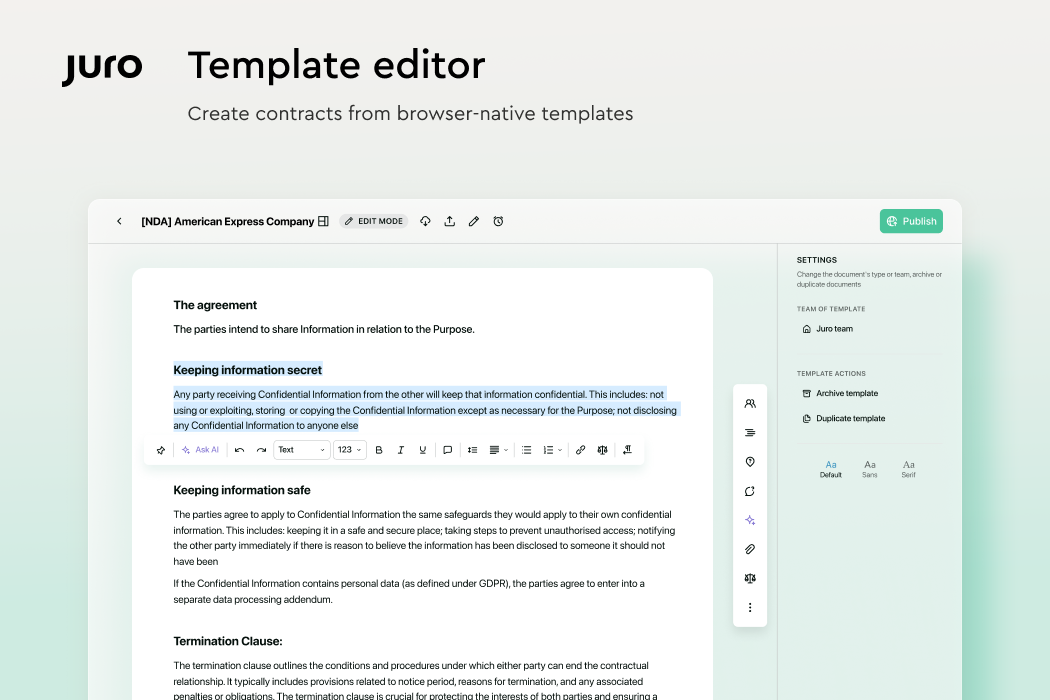
Juro is often chosen by companies looking to replace manual contract processes with a platform that is relatively easy to roll out and use across teams. Independent reviews often highlight the platform's template management features and responsive customer support.
"We have also been utilising self-serve templates like NDAs for HR or the rest of the business to use without consulting legal." — G2
"Very helpful support team. Answers as early as possible and clears all questions." — TrustRadius
Apart from this, businesses consider Juro for:
Juro's simplicity is one of its biggest strengths and also its limitation. Several reviewers note that the platform becomes less flexible as contracting requirements become more advanced.
A G2 reviewer wrote:
"For more complex contract structures or heavily negotiated agreements, the tool can sometimes reach its limits – especially regarding advanced formatting capabilities in the editor." — G2
Another review says:
"Some functionalities could be more user-friendly: The contract redlining has limited options (acceptance or rejection in full, no redlining of the redlining is available); The negotiation flow is not always clear on the platform."
Cost is another recurring concern in user reviews. A G2 reviewer noted that Juro "can be quite expensive for what we actually use it for," while another pointed to "limited visibility into pricing upfront, which can make budgeting difficult."
Someone even mentioned that:
"Personally, the pricing was a challenge for us, especially as a growing company with evolving priorities…. It became difficult to justify the cost when we were reassessing our tech stack." — Capterra
G2's review analysis also identifies recurring challenges around:
These challenges are likely to have the greatest impact on organizations with advanced contracting processes. Teams handling complex negotiations, multiple stakeholder approvals, and large contract volumes may need more flexibility than some reviewers feel the platform currently provides.
DocuSign CLM builds on DocuSign's eSignature platform to support contract creation, approvals, execution, and ongoing management. It is particularly suited to organizations with established governance processes, cross-functional stakeholders, and a need for greater visibility into contract activity across the business.

Many organizations consider DocuSign CLM as they already use DocuSign eSignature and want to extend those capabilities into contract lifecycle management. Other than that, customer reviews frequently mention DocuSign CLM's workflow features and document management functionalities.
"I like how DocuSign CLM helps manage multiple contracts, which can get hectic over time…. I also appreciate how it automates the documentation workflow, which helps a lot." — G2
"I like that Docusign CLM saves my contacts and templates, which makes it easy to use and quick. It saves me time because I don't need to start from scratch every time I use it." — G2
Additionally, companies choose DocuSign CLM for:
While DocuSign CLM is a strong enterprise-grade contract management software, user reviews consistently mention several challenges:
Multiple reviews highlight that the platform becomes expensive as usage grows. Some users specifically mention envelope limits and additional charges for advanced functionality, which can increase costs for organizations processing large volumes of agreements.
Next are the issues around the platform's UI/UX.
"DocuSign's platform feels outdated in terms of UI and UX, which seem pretty basic and old school. It definitely needs improvement in these areas. Also, the pricing can become too high, especially for higher contract values and greater numbers of envelopes. Beyond a certain point, there are more economical alternatives available." — G2
Across verified reviews, users also frequently mention:
DocuSign CLM delivers the depth and control that large enterprises often need, but it may not be the best fit for teams that prioritize quick deployment and user adoption.
Taken together, these limitations suggest that DocuSign CLM works for organizations with dedicated resources to manage implementation, workflow design, and ongoing administration.
Teams looking for a faster rollout, simpler workflow configuration, and a more intuitive experience may find the platform requires more setup and oversight than expected.
Across both Juro and DocuSign CLM, user reviews point to recurring challenges around workflow flexibility, implementation effort, ongoing administration, and contract negotiations. These factors often have the greatest impact after purchase, when teams move from evaluation to day-to-day use.
Aline is purpose-built around these requirements from day one.
Aline is an AI-native contract lifecycle management platform built for legal, procurement, finance, and sales teams with 50+–500+ employees. With Aline, you can draft and review agreements 10x faster with AI assistance, route contracts through approvals, collect signatures, and maintain a searchable contract repository.
The platform also provides visibility into key dates, obligations, and contract performance, helping teams stay organized as processes become more complex.
Juro is often chosen for its collaborative drafting experience, while DocuSign CLM is known for enterprise-grade workflow controls. Aline combines those capabilities with built-in AI and lifecycle visibility.
Key areas where Aline addresses common CLM pain points include:
Aline is a strong fit for:
Aline may not be the best fit for:
“It’s night and day. I can fix problems instantly. The platform is clean, intuitive, and our users pick it up right away.”
Christina Varela, Corporate Counsel at Jushi

Here's a quick way to see how these platforms stack up. Let's compare DocuSign CLM, Juro, and Aline so you can get a clear sense of what each one focuses on and which direction might fit your workflow best.
Juro, DocuSign CLM, and Aline were all built to help teams create more efficient contract workflows, but each one approaches the goal a little differently. Understanding their core purpose makes it easier to see which platform fits the way you work.
Juro focuses on simplicity. Its main purpose is to give teams a clean, browser-based space to draft, review, and manage contracts. If you want a lightweight document management setup that keeps contract collaboration easy, Juro leans in that direction.
DocuSign CLM takes a more structured path. It expands the familiar experience of signing documents and turns it into a full contract operation.
The goal is to bring order to complex approval flows, long review cycles, and enterprise-level governance. Companies that already rely on DocuSign often look to CLM for a deeper, more controlled process.
Aline ties everything together in one unified system. Its purpose is to help fast-growing teams streamline every part of the contract lifecycle, from drafting with AI to approvals, signatures, and long-term document management.
You get one place to work, complete with contract automation and data tools that keep contracts moving.
Let's take a look at what stands out in terms of everyday usability, integration capabilities, and the tools that support smoother contract operations.
While features often dominate CLM evaluations, implementation timelines can have an equally significant impact on adoption, resource planning, and time-to-value.
Pricing plays a big role in choosing the right contract tool, especially when each platform handles plans differently. Here's a quick look at what's publicly available so you can gauge how each option fits your budget and support needs.
Juro offers customized pricing depending on your contract size, type (NDA, SOW, M&A, and others), AI feature requirements, and integrations. Though it doesn't have public pricing, third-party estimates put typical deployments at $15,000-$60,000+ per year.
DocuSign has public pricing for its e-Signature and IAM+ e-Signature products. However, its CLM offers have customized pricing based on requirements. Multiple industry estimates place DocuSign CLM at $25,000-$100,000+ per year, with some sources mentioning $10,000-$50,000+ annually for advanced features.
Aline provides full, transparent pricing structures directly on its official website. The platform includes ongoing product support and customer support across plans.
Team Plan:
Enterprise Plan:
Find the perfect Aline plan for you.
Juro and DocuSign CLM solve different parts of the contract lifecycle well. Juro focuses on browser-based workflows, while DocuSign CLM is built for enterprise governance.
Aline takes a broader approach. Drafting, redlining, approvals, signatures, reporting, and contract intelligence work within the same workflow, supported by AI that reviews agreements against your organization's negotiation standards.
Contracts imported from cloud storage platforms undergo automatic data extraction, enabling teams to capture key terms, obligations, contract values, and renewal dates while maintaining visibility throughout the contract lifecycle.
For teams managing growing contract volumes, the core challenge is keeping reviews consistent, maintaining visibility across agreements, and ensuring contracts continue moving without creating additional administrative work (more than contract generation).
Aline addresses these challenges through AI-assisted workflows, contract intelligence, and collaborative approval processes.
The impact is already visible across customer deployments. At Xevant, Aline helped the legal team redline contracts 10x faster, save more than 20 hours per week, and reduce dependence on outside counsel by $60,000 annually while analyzing thousands of agreements in real time.
“Absolutely, I would recommend Aline without hesitation; it’s allowed us to remain agile during a period of significant business growth and complexity.”
Daniel Telford, Senior Director of Legal at Xevant


Want to see Aline in action? Schedule a 30-minute demo or explore the platform with a free 14-day trial. No credit card, implementation project, or IT lift required.
The most commonly compared options are Juro for simpler workflows and platforms like Aline for teams that want AI support, faster drafting, and smoother collaboration with external parties.
Yes, Juro is a legitimate contract platform used by many companies that want a clean, browser-based way to manage agreements. It has earned positive feedback for its ease of use and approachable design.
They serve different purposes. JotForm focuses on building forms and collecting information, while DocuSign centers on signing and managing contracts. DocuSign CLM is more advanced for organizations that need approvals, visibility, and the ability to manage access for many reviewers.
Juro does not publish pricing plans on its website.