Category:

Ironclad vs. LinkSquares: A Side-By-Side Look at Top Options

This is some text inside of a div block.

By:

Brent Farese

,

March 25, 2026

If you’re part of an in-house legal team, leading legal operations, managing procurement, or overseeing finance workflows, you’ve probably seen how quickly contracts become harder to manage as volume increases. 

Reviews stack up, approvals stall across departments, and teams spend time tracking down the latest draft instead of moving deals forward. A single contract can end up split across 3 versions, 6 comment threads, and 2 separate approval queues, making even small edits harder to track. 

Ironclad and LinkSquares often come up when organizations start looking for more structure and visibility in their contracting process.

Both platforms help optimize specific parts of contract management, from intake and collaboration to analytics and post-signature tracking. 

However, improving one stage of the workflow doesn’t always remove the operational friction. Contracts may still move between different systems for negotiation, signing, storage, and renewal, creating handoffs that quietly slow down cycle times and increase risk exposure.

Before a unified CLM approach, contract work in many mid-market organizations followed a fragmented route: a sales rep shared a draft over email, legal redlined it in Word, approvals happened across Slack or email threads, and signing moved to a separate e-signature tool. 

Renewal dates and obligations were often tracked manually in spreadsheets, creating gaps in visibility and accountability. 

Aline approaches this process differently by bringing drafting, redlining, approvals, execution, and renewals into a single lifecycle workflow, reducing the handoffs that typically slow contracts down.

In this Ironclad vs. LinkSquares comparison, we’ll look at how each platform supports current contracting needs and how Aline's lifecycle-focused solution will offer a more efficient direction for teams prioritizing speed, governance, and measurable outcomes.

What Is Ironclad?

Ironclad

Source: ironcladapp.com

Ironclad has built a good reputation as one of the most recognizable names in contract management software. It’s often the first platform that comes up when legal teams start looking for a more organized way to handle the contracting process.

If agreements are spread across long email chains, buried in shared drives, and tracked in multiple spreadsheets, finding the latest draft becomes a constant “Does anyone have the final version?” Slack message. Ironclad brings structure to that process by centralizing contracts, collaboration, and oversight within a single platform.

Over the years, it’s become known for its professional polish, extensive resources, and an active community of Ironclad users who share workflow ideas and best practices.

Ironclad also partners with large organizations that handle high contract volume, which adds to its credibility. It’s seen as a reliable system for teams that value oversight and documentation in every contract phase.

So what’s the trade-off you should know?.

Implementation can take up to 3-6 months, depending on how workflows, templates, and approval paths are configured during setup. Smaller teams will feel the lift more heavily, while larger legal departments often adopt Ironclad when sales, procurement, and finance are all handling contracts differently, and there is no single playbook.

That leads to a bigger consideration. Is the goal to enforce structure through predefined workflows, or to move faster with systems that adapt to existing playbooks? Ironclad tends to pick the first.
What Is LinkSquares?

LinkSquares

Source: linksquares.com

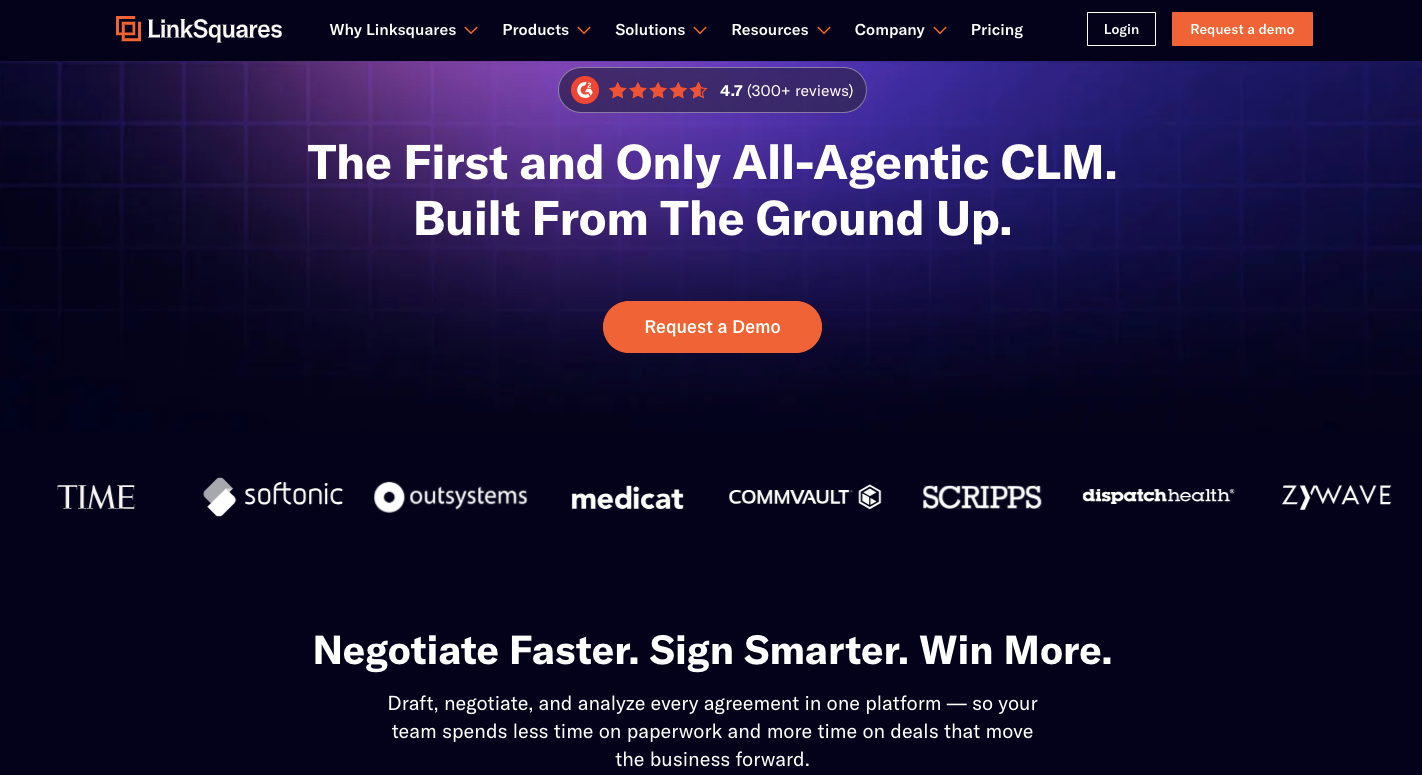
LinkSquares is a contract management platform built to help businesses understand and control the entire contract lifecycle. It’s best known for LinkSquares Analyze, the platform’s AI-powered analysis tool that automatically pulls key contract data, obligations, and renewal details.

The platform originally gained attention for its post-signature insights, helping legal teams make sense of existing agreements. It then evolved into a full contract lifecycle management system that supports creation, collaboration, and analytics within one connected space.

LinkSquares focuses heavily on visibility. It gives teams a clear view of what’s inside their contracts so they can make faster decisions, stay compliant, and avoid costly surprises down the line.

Its AI-driven summaries and reporting tools also appeal to finance and operations teams that rely on accurate data to plan and forecast.

While LinkSquares AI is powerful, the platform leans more toward legal analytics and tracking than day-to-day contract drafting or collaboration.

Still, it has built a solid reputation among companies that want a reliable way to understand what’s hidden in their contracts and use that insight to improve how they manage every stage of the lifecycle.

What Is Aline?

Aline

Aline is an AI-powered platform built for complete contract lifecycle management (from the first draft to the final signature and post-signature analysis), giving legal ops teams, general counsels, and contract managers a single place to create, review, sign, and track every agreement. Users can handle end-to-end contract mangement without changing between Word files, approval emails, eSignature tools, and scattered shared drives.

Aline’s biggest advantage comes from AI-driven accuracy paired with measurable outcomes. Smart drafting and redlining help teams save 15+ hours each week and drive up to $40K in annual savings. This happens through automatically flagging risky language, applying approved clauses, and generating ready-to-send contracts in minutes, rather than through manual drafting cycles.

Here’s what our client says:

“The redlining function is incredible. When I get a 50-page commercial agreement, I throw it in the redlining playbook and that first pass is done in 15 minutes”. - Keith Boeker, Associate Attorney, Pharmacann.

The platform’s AI legal assistant also summarizes agreements, flags obligations, and learns from your past edits to make future reviews faster and more precise.

Everything happens in one intuitive workspace, so legal, sales, and operations teams can collaborate without switching tools or losing track of version history. Built-in e-signatures, smart workflows, and detailed reporting make it easy to keep contracts moving.

Teams moving away from legacy CLM tools often say, “Month-long rollouts slow everything down.” Aline addresses that friction with no-code templates and guided onboarding that typically go live within 3–4 days, so compliant contracts can start moving the same week instead of getting stuck in long implementation cycles.

Book a demo to see how Aline can simplify your entire contract lifecycle.

Comparing Ironclad vs. LinkSquares vs. Aline

Evaluation criteria Ironclad Juro Aline
Ideal Customer Profile (ICP) Enterprise legal teams with complex contracting environments. Startups and scaling companies prioritizing self-serve contract workflows. Mid-market legal ops, general counsel teams, and contract-heavy departments.
Primary use case Enterprise CLM for complex approval chains and contract governance. Fast contract creation and lightweight lifecycle management. End-to-end contract lifecycle management combining drafting, negotiation, execution, and analytics.
AI capabilities AI contract analysis and clause extraction. AI-assisted drafting and contract suggestions. AI-assisted drafting and redlining enabling 5–10× faster contract reviews.
Workflow automation Highly customizable approval workflows. Basic lifecycle automation for approvals and signatures. Lifecycle automation connecting drafting to approvals, negotiation, and execution.
Collaboration Cross-team collaboration with audit tracking. Simple collaboration for business teams and legal. Built-in collaboration across drafting, approvals, negotiation, and execution.
Implementation timeline Typically multi-week enterprise rollout. Quick setup with minimal configuration. Guided rollout typically takes 3–4 days.
Migration support Enterprise migration support and integrations. Lightweight import of contracts and templates. Structured migration support for importing contract repositories and templates.
Strength Deep enterprise workflow customization. Ease of use and rapid adoption. Faster contract turnaround and reduced manual legal workload.
Limitations Higher implementation complexity. Less suited for highly complex enterprise workflows. Less enterprise-level customization compared to the largest CLM platforms.
Contract lifecycle coverage Full enterprise lifecycle coverage. Creation to signature lifecycle. Full draft-to-renew lifecycle management with analytics and reporting.

Redline and negotiate contracts 50%+ faster with Aline’s AI-supported workflows. Schedule a demo to see how accelerated drafting and negotiation can optimize your entire contract lifecycle.

What the Comparison Tables Won’t Tell You

Feature tables make Ironclad and LinkSquares look similar on paper, but they solve very different parts of the contracting problem. The real results show up after the first draft is created, when approvals stall, ownership becomes unclear, and contracts move between systems. 

Below is what each platform actually owns in the workflow, where gaps appear, and how Aline addresses them.

Ironclad: Strong Governance, Heavier Operational Lift

Ironclad is designed to bring structure to contracting through workflow automation, approval routing, and standardized processes. Large legal departments often adopt it when contract execution varies across teams and governance needs to be enforced.

What it does not always solve:

  • Long implementation timelines before value is realized
  • Limited flexibility for non-standard deal structures
  • Higher cost considerations for smaller teams or lighter usage

Because of this, contract speed can depend heavily on the volume and how well workflows are configured and maintained internally, rather than on automation alone.

LinkSquares: Deep Visibility, Limited Lifecycle Control

LinkSquares has an analytics-driven approach that uses AI to extract insights and track obligations across signed agreements. Legal and finance teams often rely on it to understand risk exposure and renewal timelines.

What it does not always solve:

  • Limited natural-language search for faster clause discovery
  • Reduced sales self-service when reviewing key deal terms
  • AI party extraction requires ongoing manual cleanup

This means teams may spend more time manually searching, validating data, and navigating contracts, which can slow day-to-day execution even when visibility into agreements is strong.


How Aline Closes the Lifecycle Gap

Ironclad is often used to manage the front end of contracting, including request intake, collaboration, and approval workflows. However, once a contract is executed, teams may still rely on separate systems or manual trackers to monitor obligations, deadlines, or renewals.

LinkSquares, on the other hand, is widely adopted for post-signature visibility and analytics. Its strengths lie in helping legal teams search, analyze, and report on contract data after agreements are stored in the repository. But drafting, negotiation, and approval routing are not its primary focus.

This creates a workflow where organizations may rely on multiple tools to manage different stages of the same contract lifecycle, often bringing in handoffs between systems during negotiation, execution, and renewal tracking.

Aline is purpose-built to eliminate that fragmentation. Instead of optimizing a single stage, it integrates drafting, redlining, approvals, execution, obligation tracking, and renewals into a single lifecycle workflow, allowing contracts to move from creation to renewal without switching platforms or losing visibility. 

Here’s how it bridges the gap:

What’s missing in Ironclad and LinkSquares How Aline covers it
Long implementation timelines before value is realized Guided rollout in 3–4 days, enabling teams to begin drafting, reviewing, and approving contracts quickly.
Limited flexibility for non-standard deal structures AI-assisted drafting and adaptive workflows support custom deal structures without rigid template constraints.
Higher cost pressure for smaller teams or lighter contract volumes Transparent pricing enables accurate budgeting while supporting smaller legal teams.
Limited natural-language search for faster clause discovery AI-powered search and metadata extraction identify key clauses and obligations instantly.
Reduced sales self-service when reviewing key contract terms Shared lifecycle visibility allows sales teams to quickly access contract status and critical terms.
AI party extraction requires ongoing manual cleanup Structured data capture improves extraction accuracy and reduces manual corrections.

Key Features

Each platform tackles legal workflow automation and visibility in its own way. Comparing them helps you understand which system truly supports how your team works:

Ironclad Features

  • Workflow designer: Create structured processes that guide contracts through complex approval chains with clear accountability for stakeholders.
  • Version control: Keep every edit and comment tracked, ensuring consistency across documents.
  • Customization options: Adjust automated workflows and layouts to match how your internal teams prefer to operate.
  • Centralized repository: Organize all agreements in a contract repository for procurement teams and legal to access easily.
  • Interactive dashboards: View contract progress, performance metrics, and upcoming renewals in a single place.
  • Salesforce integration: Connect contract data directly with your CRM so sales teams can track deal status, manage approvals, and generate agreements without leaving Salesforce.

This level of workflow customization is strong, but it often requires dedicated resources and ongoing effort to configure and maintain processes that other tools simplify by default.

LinkSquares Features

  • Centralized repository: Allow sales and procurement teams to search, categorize, and manage contracts in one location.
  • AI-powered analysis: Use the platform's AI to surface key data like critical terms and contract obligations instantly across your library.
  • Post-signature tracking: Monitor contract renewals, expirations, and risks tied to specific contract types.
  • Version control: Maintain accuracy and compliance through clear recordkeeping.
  • Interactive dashboards: Turn raw contract data into reports that highlight exposure, timelines, and performance.

While analytics and tracking are clear strengths, organizations looking for a more unified draft-to-renew workflow may look beyond repository-focused tools.

Aline Features

  • Contract workflow automation: Aline automates contract routing, approvals, and post-signature tasks, giving teams transparent tracking while smart routing reduces approval delays by up to 40–50% and cuts the manual work of status follow-ups.
  • No-code template builder: Legal teams can create reusable, dynamic templates without technical help. Drag-and-drop inputs and Microsoft Word integration allow sakes teams to generate compliant agreements themselves, reducing draft-to-send time by up to 70%.
  • AI-powered legal documents: Using GPT-4, Aline assists with drafting, redlining, and reviewing contracts. This helps teams identify risks faster and complete reviews 2–3× quicker, saving 15+ hours per week on manual edits.
  • AlineSign e-signatures: Built-in electronic signatures keep signing within one workflow, support multi-party approvals, and help contracts be executed 10–25% faster. AlineSign complies with ESIGN and eIDAS standards, making signatures legally binding across the U.S., the EU, and other regions, with every action tied to a verifiable audit trail and version history.
  • Collaboration tools: Teams can comment, assign tasks, and approve directly inside contracts to keep feedback centralized, reducing email back-and-forth by 50% and shortening revision cycles by up to 30%.
  • Reporting and data analytics: Aline automatically extracts key terms, renewal dates, and obligations from every agreement. Interactive dashboards make contract data easier to act on, improving clause discovery speed by 2–3× and helping prevent missed renewal deadlines. 
  • Compliance and security: Every contract is stored in a secure, centralized AI Repository with audit trails and GDPR-ready encryption. It helps reduce audit preparation time by 40-60% and strengthens compliance oversight.
  • User-friendly interface: Designed for quick adoption, Aline offers a clean, intuitive user interface that makes it easy to find documents, track status, and collaborate across teams. It enables teams to onboard in days instead of weeks and reach active usage up to 70% faster.
  • Unified workspace: By combining drafting, approvals, signing, and reporting into a single continuous workflow, Aline eliminates multiple tool switches and reduces hand-offs by up to 7 per contract. This consolidation helps teams avoid the delays that often happen when workflows move between separate systems, keeping contracts progressing without fragmented execution. 

If you want to know more, here's an overview of Aline.

Beyond Features: The Aline Advantage

Capability area What Aline delivers Why it matters for ICP
Lifecycle continuity Contracts move from drafting through negotiation, execution, storage, and renewal within one unified workflow. GCs and legal ops reduce delays and maintain continuity across the full contract lifecycle.
Reduced operational handoffs Workflow automation removes manual routing between drafting, review, approvals, and signing. Contract managers move deals forward faster without waiting on manual coordination.
Cross-functional visibility Shared dashboards and lifecycle status tracking across legal, sales, and finance. Sales and finance stay aligned without manual status checks.
Faster internal alignment Automated approvals and clause playbooks streamline decision-making. Scaling teams avoid risk as contract volume grows.
Predictable contract velocity AI-assisted drafting and structured workflows accelerate review cycles. Leadership gains reliable timelines and faster deal execution.
Lower process overhead Automation reduces manual tracking, email coordination, and spreadsheet management. Legal ops reduce administrative load while maintaining governance.

Who It's Best For

Ironclad

Ironclad is best suited for enterprise general counsels, legal operations leaders, and legal teams at larger organizations (2000+ employees) where contracting varies widely across departments and governance is a priority. If sales uses one template, procurement another, and legal manually enforces playbooks through spreadsheets and email approvals, Ironclad helps bring standardization. 

It is less ideal for smaller teams or fast-moving startups that need quick deployment, flexible workflows, or a lightweight setup without dedicated CLM administrators.

LinkSquares

LinkSquares works well for legal, finance, and operations teams at mid-market companies (200–2,000 employees) that need stronger visibility into executed contracts and data-based reporting. 

Organizations dealing with scattered repositories, manual clause tracking, or renewal deadlines lost in spreadsheets benefit from its analytics-driven approach. 

However, it may not be the best fit for teams looking for deep drafting automation, heavy sales self-service, or fully unified workflows that reduce manual searching and data cleanup.

Aline

Aline is a strong fit for General Counsels, VP Legal, legal ops leaders, and contract managers at growing companies (50–5,000 employees) who feel stuck being the gatekeeper for every deal. 

If the sales team is waiting on legal approvals, finance has no clear view of upcoming renewals, or deals are taking weeks to get approved, the problem is rarely a lack of effort; it is the workflow itself. 

Aline brings drafting, approvals, signing, and reporting into one place so contracts keep moving without constant follow-ups or spreadsheet tracking. 

It is built for teams that want AI-driven automation and shared visibility across departments, without long rollouts or heavy IT involvement that usually comes with enterprise-first CLMs.

Pricing

Pricing for contract management tools can vary widely, especially since each platform targets different types of teams and contract volumes. Here are pricing details for each tool on our list:

Ironclad Pricing

Ironclad does not list its pricing publicly. Plans are customized based on company size, contract volume, and implementation needs. Because the platform is designed for larger organizations, the cost usually includes onboarding and long-term configuration support.

LinkSquares Pricing

LinkSquares also offers custom pricing. The final cost depends on the number of users, contract volume, and which modules you need, such as contract analysis, drafting, or full lifecycle management.
Aline Pricing

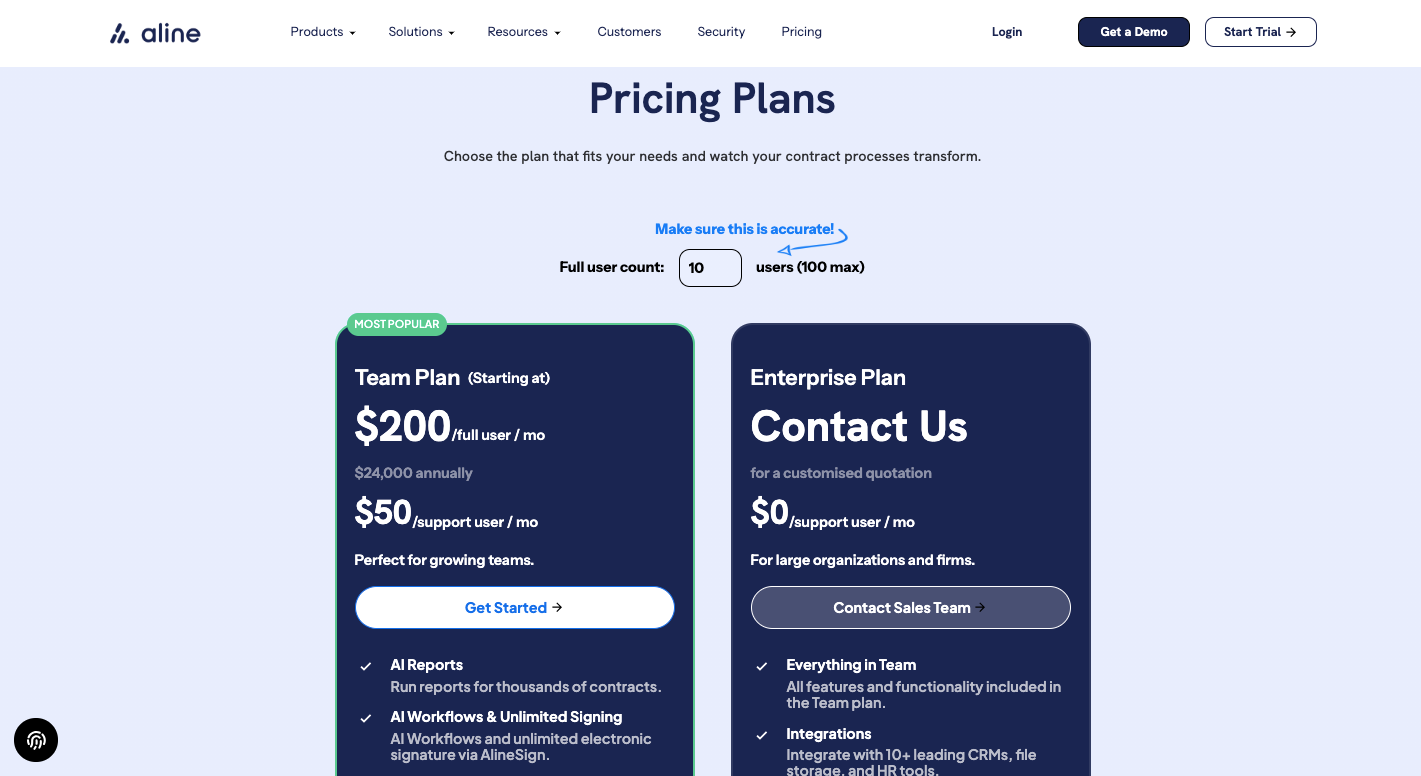
Aline provides transparent pricing that’s easy to understand.

  • Team Plan: $200 per full user per month (billed annually at $24,000) and $50 per support user per month. This includes unlimited documents, workflows, reports, and e-signatures through AlineSign, plus 20 hours of onboarding, training, and support.
  • Enterprise Plan: Pricing available upon request. It includes everything in the Team Plan along with integrations for CRM and document storage tools, single sign-on, advanced analytics, and personalized onboarding.

View Aline’s full pricing details to find the right fit for your team.

Quick-Scan Buyer Checks: What Buyers Want to Know

Will this plug into Slack, Salesforce, and DocuSign without a six-month IT sprint?
Yes. Aline integrates with file storage and business tools like Google Drive, Dropbox, Box, and SharePoint to centralize contracts and synchronize workflows across systems without heavy IT lift — so teams can get up and running quickly.
AI hallucinations could slip bad language into our contracts.
Aline’s AI operates inside structured contract playbooks and clause logic defined by your legal team — not free-form generation. Redlines and suggestions are constrained by approved templates, fallback positions, and organizational standards, keeping outputs aligned with your preferred legal language and risk thresholds.
We already own a redlining add-on or plugin. Why switch?
Redlining add-ons typically stop at markup. Aline goes further with built-in approvals, workflow automation, e-signatures, clause extraction, analytics, and a searchable AI repository — bringing drafting, negotiation, execution, and reporting into one platform without hand-offs.
We’re not sure the volume is there yet.
You can test Aline risk-free in a live environment with the 14-day sandbox — no credit card required. See how contract reviews and approvals perform on real deals before committing.
How fast do we break even?
Mid-market teams typically recoup their first-year license in under 90 days by reducing outside-counsel review by 40% and shortening each deal cycle by about 5 days.
Is our data really secure and compliant?
SOC 2 Type II compliant and GDPR-ready, with encryption in transit and at rest, role-based access controls, and a complete audit trail. Aline also undergoes regular penetration testing to maintain rigorous security standards.

Choosing Aline for Smarter Contract Management

Choosing between Ironclad, LinkSquares, and Aline ultimately comes down to how you want contracts to move through your business and what outcomes matter most. 

If your priority is enforcing structure across large teams with complex workflows, Ironclad delivers governance and control. If visibility into signed agreements, obligations, and renewal risk is the main goal, LinkSquares brings strong analytics and reporting into the process.
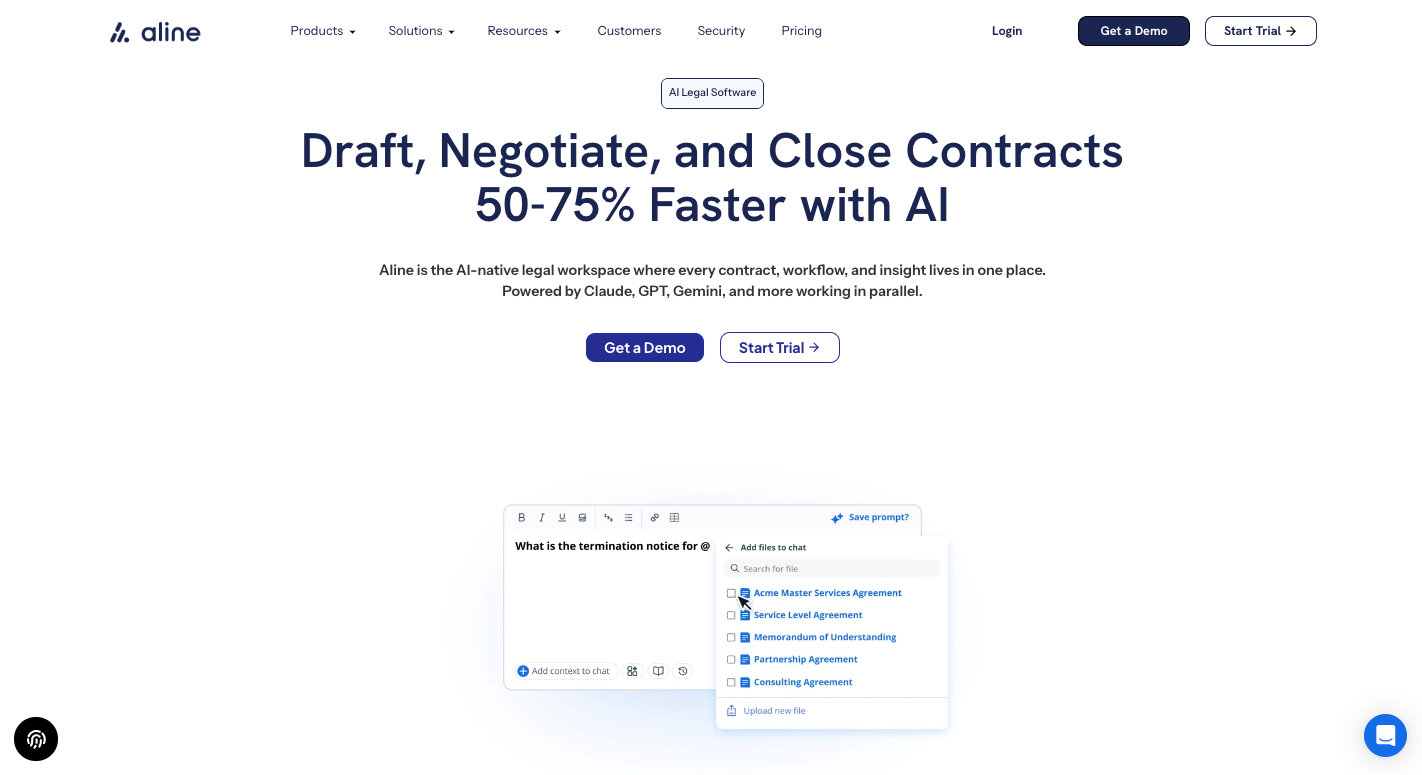
For teams focused on faster execution and measurable results, Aline becomes the stronger choice as it provides:

  • 80%+ faster contract turnaround through AI-assisted drafting and redlining workflows
  • Redlining in under 2 minutes, accelerating review cycles across deals
  • 15+ hours saved per week by reducing manual revisions and repetitive contract work.
  • 2–3× faster clause discovery and reporting with automated metadata extraction.

If you are evaluating tools to move deals forward without constant follow-ups, provide sales and finance teams with real-time insights, and reduce operational drag around agreements, Aline offers a more outcome-driven approach to contract lifecycle management. 

Ready to see what faster contract cycles actually look like? Try Aline’s 14-day sandbox to see visibility in action. Start free today!

FAQs About Ironclad vs. LinkSquares

Is the Ironclad app legit?

Yes, Ironclad is a legitimate and widely used contract management platform trusted by thousands of customers across industries. Many legal and sales teams rely on it to manage and track their contracts efficiently. It’s particularly known for helping larger organizations create structured approval workflows and maintain compliance.

What is the difference between Ironclad and DocuSign CLM?

Ironclad is focused on workflow automation and collaboration during the contracting process, while DocuSign CLM builds on its well-known e-signature tools to manage agreements after signing. If you already use DocuSign for signatures, integrating CLM feels natural. But for end-to-end contract management, Ironclad offers more options for tracking and automation.

What is the difference between Ironclad and Icertis?

Both are enterprise-level CLM solutions, but they differ in focus. Ironclad emphasizes usability and collaboration across departments, while Icertis targets highly regulated industries with more complex compliance needs. The choice often comes down to whether your team values flexibility or detailed governance controls.

How much does Ironclad CLM cost?

Ironclad doesn’t publish public pricing. Costs depend on user count, workflow complexity, and the number of contracts your team manages. Most companies go through a thorough review with the sales and support team to get a quote that fits their needs.

Is LinkSquares a good alternative to Ironclad?

Yes, LinkSquares can be a strong Ironclad alternative for teams focused on contract analytics and reporting. While Ironclad is built for collaboration and automation, LinkSquares leans more toward post-signature visibility. Both platforms help store contracts, track renewals, and keep agreement data accessible to legal and finance teams.

Which platform offers better contract management overall?

That depends on your priorities. Ironclad and LinkSquares serve different needs. Ironclad focuses on drafting, collaboration, and workflow control, while LinkSquares specializes in analysis and post-signature tracking. If you want a balance of automation, reporting, and simple contract creation, Aline brings all of it together in one intuitive system that’s truly a game changer for teams looking to simplify contract management.

Draft, redline, and query legal documents 10X faster with AI

More Posts

You Might Also Like

No items found.

Want to learn more about Aline Workflows? Get in touch.

Learn more




