As your contracting process expands across more teams and deal types, not every agreement will follow the workflow you started with.
Once those exceptions start piling up, Ironclad can start feeling restrictive: workflow configuration gets more involved, searching a growing repository can become frustrating, and reporting and integrations don't always give you the flexibility you need.
The difference becomes harder to absorb when you're already juggling a heavy contracting workload with a lean legal function. You'll notice this more if you're:
At this stage, you need a CLM that can accommodate those variations without adding more administrative work.
The alternatives covered in this guide address most of these gaps you may be facing with Ironclad. But not every platform takes the same approach. Some are point solutions built around a specific contracting workflow.
And then there's Aline, an end-to-end contract lifecycle management platform where AI handles routine contract work and shortens contract cycles by 30-50%, without requiring you to manage every adjustment manually.
Let's look at how each platform handles contract management and where it fits best, so you can find the option that makes sense for your organization.
Five platforms can fit five very different contracting situations. Start with yours, then see which one lines up.
| If your priority is... | Best pick |
|---|---|
| An AI-native CLM that handles drafting, review, approvals, and signing, with a rollout in 3-4 days. | Aline |
| A lightweight contract platform that lets your business teams create and manage agreements with less legal involvement. | Juro |
| Keeping contract management closely connected to your existing DocuSign setup. | DocuSign CLM |
| A basic platform for contract storage, search, and management without a heavy CLM setup. | ContractWorks |
| To standardize contract creation and automate repetitive agreement workflows. | Contractbook |
Ironclad can work well when your contracting process fits neatly into the system. The experience can change when your requirements become more specific, and the standard setup starts demanding more from your team. Here are the areas where the drawback feels more visible:
Ironclad's pricing can be a sticking point when you don't need the full weight of an enterprise CLM. A review describes the platform as "very costly," even though it's good value for money, and questions its fit for small businesses.
Also, Ironclad's pricing can add up quickly, with costs for smaller teams starting at $60,000.
The total cost of ownership can extend beyond the core subscription. Depending on what you need, integrations, implementation services, additional entitlements, and ongoing administration can all factor into the overall investment.
If your contracting process is complex, configuring Ironclad to match your requirements can take extra time before your team can use it as intended. The friction here is the effort involved in the initial setup and customization, particularly when your workflows aren't simple.
Ironclad's AI can be less effective when your legal team reviews a high volume of third-party agreements with different structures and clause language.
A platform user found that the AI could misread clauses, flag provisions as missing when they appeared elsewhere in the document, and struggle with agreements that didn't follow a consistent format.
The issue is less about whether Ironclad has AI features and more about how reliably those features handle contracts that don't follow a predictable structure. If your team spends much of its time reviewing third-party paper, inaccurate clause identification can mean checking the document yourself instead of cutting review time.
Finding a specific agreement can take more effort when your repository depends heavily on filters, metadata, and tags. Several reviews point to this drawback, with users describing situations where an imperfectly tagged contract becomes difficult to locate, or a search returns a long list of possible matches instead of the agreement they need.
The difficulty comes from how much information you need to know about a contract before you can reliably find it. If your team regularly looks for older customer, supplier, or other agreements, a contract search process that depends on precise metadata can turn a quick lookup into a longer exercise.
User reviews also flag a few other areas where your team can run into limitations:
Ironclad gives you a broad set of tools for managing contract operations, but tailoring those tools to your exact requirements can take time. If you want AI to handle the contract lifecycle across intake, drafting, review, and analysis without a lengthy implementation, you can consider a platform where this approach is part of the core workflow.
If you're not sure which Ironclad alternative you should try, we've rounded up some of the best competitors to point you in the right direction. These handpicked tools offer similar features while catering to different business needs.
Before getting into the details, here's what the five options come with:
| Alternative | Best fit use case | Key limitations | Implementation timeline | Pricing |
|---|---|---|---|---|
| Aline | Teams that want AI to handle more of the contract workload, with intake, review, drafting, signing, repository management, and contract intelligence in one platform. | More than you need if you only want basic contract storage and tracking. | 3-4 days for most teams | $200/full user/month for a 10-user Team plan, billed annually; $50/support user/month. Enterprise is custom. |
| Juro | Mid-market teams that want collaborative contract creation, negotiation, approval, and signing with business-system integrations. | Less suited if you need highly specialized reporting or want publicly listed pricing. | Juro reports an average of 21 days. | Custom pricing. Third-party estimates generally put deployments around $15,000-$60,000+/year. |
| DocuSign CLM | Mid-sized and enterprise teams that need structured CLM and already use DocuSign, Salesforce, or SAP Ariba. | Can be excessive for smaller teams and requires a longer implementation than lighter CLMs. | Up to 3 months | Custom quote for CLM. Third-party estimates say $25,000-$100,000+/year for mid-sized deployments. |
| ContractWorks | Teams that mainly need secure contract storage, search, tracking, reminders, and controlled access without a heavyweight CLM. | Not the best fit for complex redlining, clause negotiation, advanced workflow design, or flexible reporting/bulk editing. | Up to 4 weeks | Starts at $600/month. |
| Contractbook | Small and mid-sized businesses managing recurring contracts. | Current plans are billed annually; granular user permissions and actions may be limited. | Not publicly stated. | Starts at €399 per month. |
If you're looking for an alternative to the setup effort, AI limitations, search friction, or cost that Ironclad can bring, Aline can be a better fit, as it's an AI-native platform that handles more of the routine contract work.
Your existing contracts don't need to stay scattered across Google Drive, Dropbox, Box, SharePoint, and local folders. Aline syncs those sources into a single AI-powered repository, so you can work with the contracts you already have without manually moving each document into the CLM.
The platform automatically pulls key details like effective dates, contract values, and termination dates from your agreements. Its custom AI reports can process 10K+ documents in real time, giving you a broader view of your entire contract portfolio at once.
Aline handles what happens before the contract reaches your legal team. Its agentic intake works like this:
Incoming request → Create a triage plan → Collect missing information → Select the right workflow/template → Execute and track.
You can bring contract requests into Aline through web chat, Slack, or email, giving your teams a familiar way to start the process.
Once the intake is complete, Aline can kick off the relevant process, coordinate approvals with the right stakeholders, respond directly in the channel, and keep a record of each action. When a decision requires legal judgment, the agent escalates it to a human for review.
Aline also lets you apply your firm's positions across contract work. Through the platform, you can:
You get more value from this when you're handling a high volume of third-party agreements or repeat transactional work. Your lawyers can start with a draft or first pass based on the firm's existing language, then focus their attention on the provisions that actually need legal judgment.
All of these AI-driven workflows come with a 3-4 day rollout, compared with the 3-6 months often required to implement enterprise CLM platforms.
There are 8,400 contracts in the Aline platform. Answering questions about our data or risk used to take hours, days, even weeks. Now I can just ask.
Kimberly Paine, General Counsel at TRG Screen

We needed to identify a specific notification window across all contracts. One query returned accurate results in seconds. That level of speed and confidence is a game-changer for operational response.
Glenn Cionek, RevOps at Wallarm

The difference comes down to what happens under the AI. Ironclad's AI is built into a workflow-first platform, while Aline runs Claude, ChatGPT, and Gemini in parallel on the same contract task and cross-checks their outputs with semantic scoring.
Single-model tools inherit that model's blind spots, which is exactly the failure pattern Ironclad users describe in third-party papers, where clauses get misread or flagged as missing when they appear elsewhere in the document.
While Ironclad caters to large enterprises, Aline is a better fit for fast-growing businesses that need AI-powered contract management without a steep learning curve.
Aline eliminates the need for multiple tools by integrating contract creation, negotiation, signing, obligation tracking, and other essential contract tools in one platform.
Is AI accurate enough for real legal documents?
AI can handle many legal contract tasks reliably, but it still needs human oversight for decisions that require legal judgment. Aline supports that review with multiple models working in parallel, responses grounded in your contracts and approved sources, and citations that let you check the underlying clause or precedent before relying on the result.
What happens to our existing contracts and data if we switch or leave Aline later?
You retain ownership of your data. You will normally get a grace period after cancellation to download your documents before they are removed from Aline's systems.
We're already paying for Ironclad. Is switching really worth it?
Ironclad can work well if you need structured workflows and approval controls. If the 4-month implementation feels too long, you rely on several tools around your CLM, or its AI doesn't handle enough of the contract work, those are good reasons to consider switching. Aline addresses those specific gaps with a 3-4 day rollout, more contract work handled in one platform, and uses multiple AI models across the workflow. You can also replace 5-7 separate tools for review, signature, storage, and analysis and deliver 5-10x ROI within 3-6 months.
How long does migration from Ironclad actually take?
Most teams can get started within a few days. Aline handles the move from your existing setup, including template migration, playbook configuration, and team training. You don't need on-premises infrastructure or a lengthy implementation project.
See how Aline handles the contracts your team works with every day. Book a demo to see it in action using a historical or anonymized agreement. Or start a free trial.
Juro is a contract management platform suitable for businesses that want a fast, collaborative, and straightforward way to handle contracts.
It replaces traditional workflows with a modern system that combines drafting, negotiation, approval, and e-signing in one seamless experience.
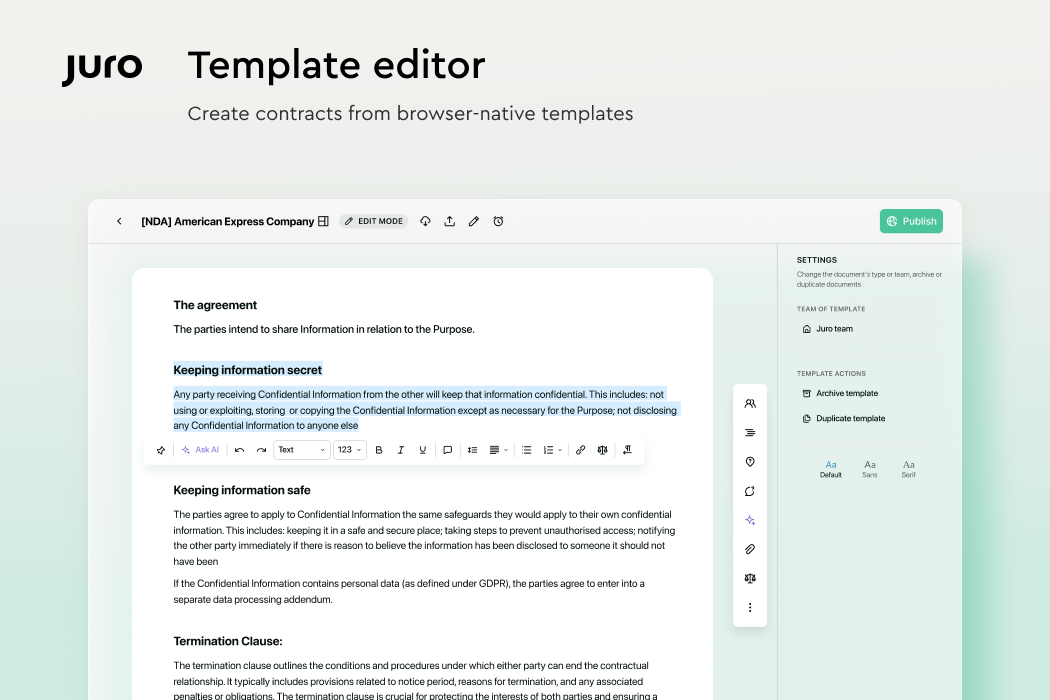
With a user-friendly interface and strong automation capabilities, Juro can be a good fit for legal, sales, and HR teams that need to move quickly without relying on multiple tools.
Juro takes a more flexible and user-friendly approach compared to Ironclad, which makes it suitable for teams that need a more intuitive contract management solution.
While Ironclad focuses on deep AI analytics and enterprise-level automation, Juro is meant for speed and simplicity.
Its real-time contract collaboration tools and no-code workflows make it a strong choice for companies that want to streamline contract processes but don't want complex configurations.
DocuSign CLM expands on the well-known e-signature platform to deliver a complete contract lifecycle management system.
The platform helps legal and business teams create, negotiate, approve, and store contracts efficiently. As a whole, its features can help improve organization and visibility across high contract volumes.
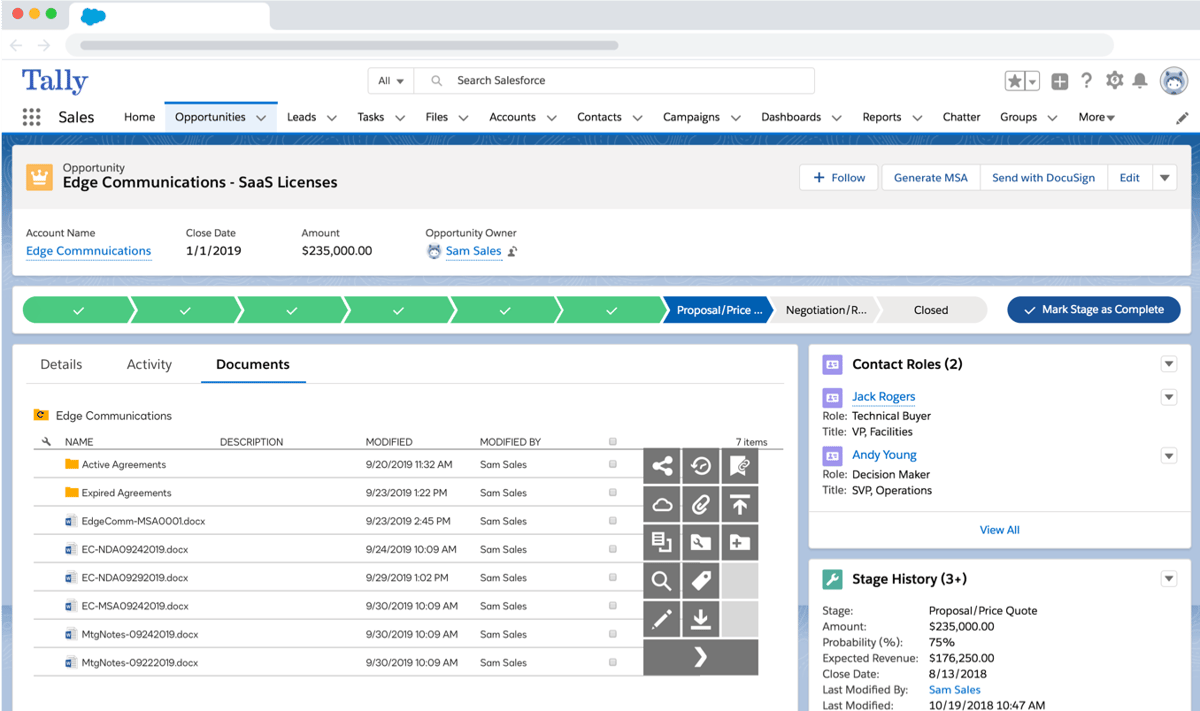
Built on DocuSign's trusted signing technology, it offers a smooth e-signing process paired with automated workflows and contract insights that help reduce contract turnaround times and keep agreements moving forward.
DocuSign CLM is a solid alternative to Ironclad, especially for businesses that already rely on DocuSign's e-signature software. Its strength lies in seamlessly integrating contract management with a trusted signing solution.
Ironclad focuses more on AI-driven automation and deep contract analytics, whereas DocuSign CLM prioritizes workflow efficiency and compliance tracking.
With all that in mind, companies looking for a secure and well-integrated contract management system with built-in e-signatures may find DocuSign CLM a better option.
ContractWorks is a contract management solution made for businesses that want a simple, secure, and cost-effective way to manage agreements. Its focus is on usability and offering quick setup, built-in e-signatures, and strong data protection.
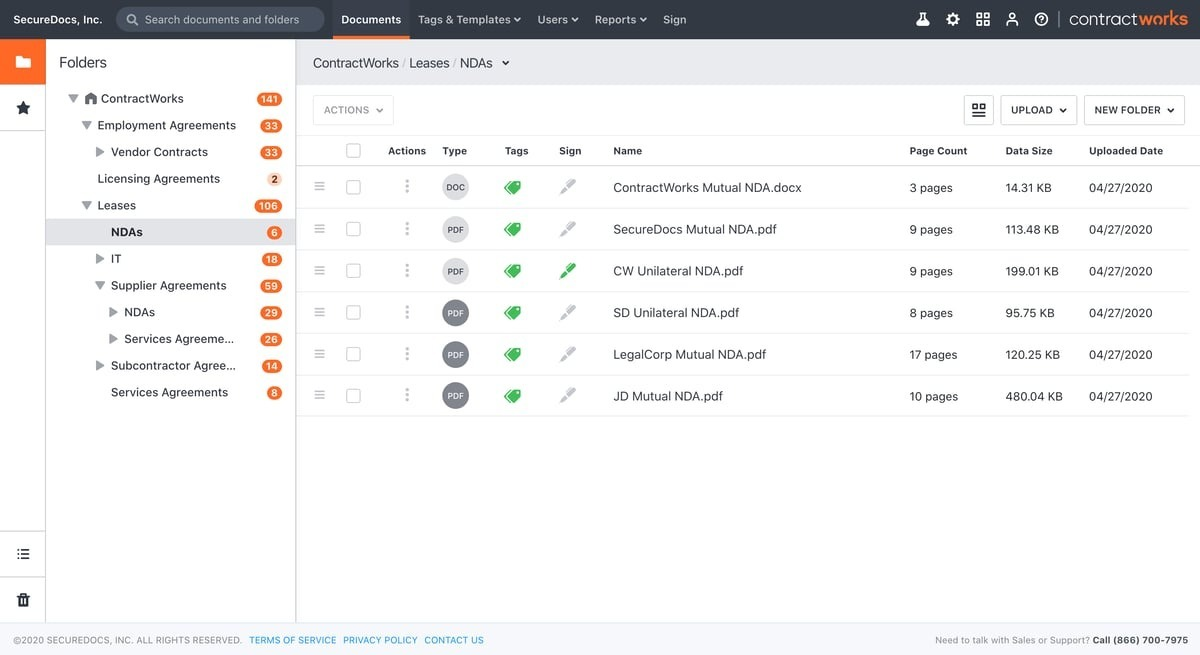
Unlike platforms centered on advanced contract workflow automation or large-scale customization, ContractWorks appeals to teams that need to store and sign contracts efficiently.
Moreover, its features help companies gain visibility into key obligations, organize related documents, and connect seamlessly with existing business applications without the complexity of a full clause library or enterprise-level setup.
ContractWorks stands out as a simpler and more affordable Ironclad competitor. It's a practical choice for teams that don't require complex AI-driven features found in enterprise contract management software.
Ironclad caters to large organizations managing high-volume workflows. Meanwhile, ContractWorks focuses on accessibility for non-technical users who need a secure and straightforward way to handle contracts.
Plus, its clean interface, easy tracking, and emphasis on security make it suitable for legal and sales teams that value usability and cost efficiency over advanced automation.
Contractbook takes a digital-first approach to contract management to give teams complete visibility across the entire lifecycle of an agreement.
Essentially, this CLM software platform serves organizations in various sectors that need a clear, efficient way to manage complex agreements from drafting to signing.
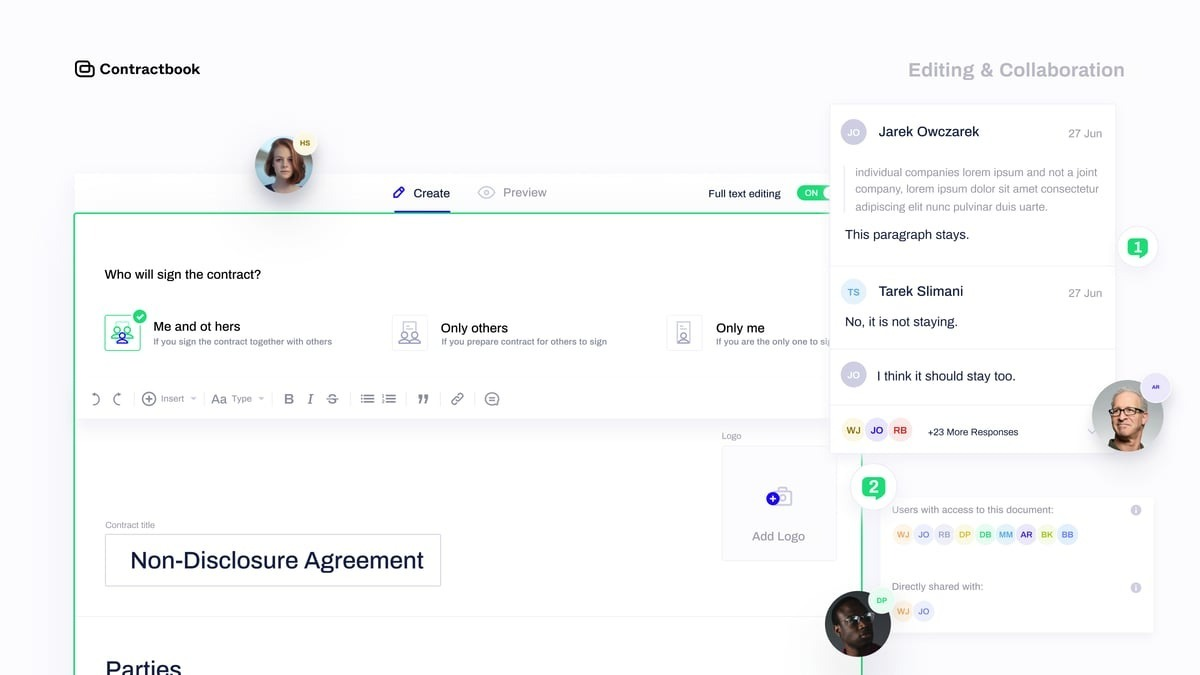
Thanks to pre-approved clauses, automated workflows, and built-in collaboration tools, Contractbook helps teams work faster and make better decisions through actionable insights, all without relying on scattered files or disconnected systems.
Ironclad is designed for enterprises with complex workflows and AI-powered contract analysis. Contractbook is better suited for teams that need a simple, structured process.
For smaller businesses, Ironclad's advanced features can sometimes fall short of expectations when the goal is speed and ease of use rather than deep configuration.
On the flip side, Contractbook focuses on keeping contracts easy to manage while still connecting with other business systems that teams already rely on.
Ironclad makes sense if your priority is having a CLM with established workflows and controls. You have a solid option when those processes already work for your team, and you don't need to change how you handle your contracts.
Ironclad makes you configure the system before it works for you. The alternative bet is a system that works for you before you set it up.
Aline follows that model, letting you start working across contract drafting, review, negotiation, approvals, execution, and contract intelligence without extensive upfront configuration.
Your team can work from existing approvals and playbooks, so the system supports how you already handle contracts instead of forcing every agreement through the same process.
The platform puts several leading AI models to work on the same contract task, including Claude, ChatGPT, and Gemini, with their outputs cross-checked using semantic scoring. This helps avoid hallucinations from relying on a single AI model.
Aline's agentic AI can assess incoming requests and determine the appropriate workflow based on the information provided, giving your team more flexibility as requirements change, whereas Ironclad can take more setup work when your contracting rules are complex or need to change over time.
Also, despite this extensive feature set, Aline comes at $200/full user (10 users) per month. It's billed annually, and every support user costs $50 per month. That puts you at a considerably lower cost than Ironclad while still giving you a comprehensive AI-supported contract platform and a seven-day rollout.
From our clients:
We were able to see renewal timelines and clauses across hundreds of contracts instantly. What used to be hours of searching now takes minutes.
Erin Zasada, Legal Counsel at Bison Transport
Aline has saved me hundreds of hours analyzing thousands of contracts over the last year. The platform is intuitive, and we were able to start getting value without a long ramp-up.
Larissa Pimentel, Sr. Legal Advisor at Sophos
Aline's reporting has been a game-changer for us. It gives our legal team an immediate, dependable source of truth across every contract, letting us surface critical obligations and risk details in minutes instead of weeks of manual review.
Jamie Emmerich, Senior Corporate Paralegal at DailyPay

Start your free trial today and see if Aline is the Ironclad alternative your team has been looking for.
Ironclad focuses on workflow automation and ease of use, while Icertis is built for large enterprises with complex regulatory and data needs. Icertis works well for organizations that require heavy customization and strict governance to meet regulatory requirements, while Ironclad tends to appeal to teams that want faster adoption and simpler contract processes.
Intelagree positions itself as an AI native platform with a strong emphasis on analytics and reporting. Its data-first approach allows teams to extract thousands of data points across contracts, which can appeal to organizations focused on insights. Ironclad, on the other hand, emphasizes structured workflows and contract routing over deep analytics.
Ironclad and DocuSign operate in overlapping but different areas. DocuSign is best known for e-signatures and later expanded into CLM, while Ironclad entered the market as a full CLM vendor from the start.
Business users often look at how easily a platform supports new contracts, maintains version control, and connects contract work to sales and legal processes. Ease of implementation, access to a responsive support team, and the ability to adapt workflows over time tend to matter more than feature depth alone.
Yes. Some platforms offer tighter Salesforce integration and allow teams to collaborate in tools like Google Docs while keeping contracts structured and approved. These options appeal to teams that want contracts to stay connected to revenue workflows while still helping ensure compliance.
Ironclad's pricing structure often reflects its enterprise focus, which can feel limiting for teams that want flexibility. Other platforms take a different approach, offering faster setup, clearer alignment with data needs, and new functionality over time without heavy manual tagging or complex configuration.