Around 60% of organizations say poor visibility into contract data makes contract management harder. The impact becomes even more noticeable when you're a general counsel, legal operations lead, or procurement director responsible for managing 500+ agreements.
You spend more time tracking down renewal dates, compliance obligations, pricing terms, and contract clauses than putting that information to work.
That challenge often shows up in routine requests like these:
When the information isn't easy to find, those everyday requests become much harder to handle. One missed renewal can mean another year of unwanted spend. One overlooked clause can create unnecessary risk. One missing agreement during an audit can put your team on the back foot. When those moments add up, legal often gets blamed for being the bottleneck.
Contract repository software helps solve this issue by keeping every agreement and its key details in one searchable place.
A basic platform stores your agreements, but you still need to open each contract to find the renewal date, payment term, obligation, or clause you're looking for. AI-powered platforms go further by extracting that information across your entire contract portfolio, so you can locate the key terms instead of reviewing every agreement manually.
As your contract volumes increase, those capabilities start to matter even more. A platform that can't scale with your business can leave you replacing your repository sooner than planned. Without AI-powered extraction, routine questions about clauses, obligations, payment terms, and renewals are still likely to land with your team.
Not every contract repository is built the same way.
Below, we'll compare 7 leading contract repository software solutions, including Aline, to help you understand where they differ, who they're best suited for, and how Aline's AI-powered contract lifecycle management (CLM) extends beyond traditional repositories.
| If your biggest challenge is... | You need... | Best fit |
|---|---|---|
| Finding clauses, obligations, renewal dates, or payment terms across hundreds of contracts | AI-powered contract intelligence | Aline |
| Managing complex approval workflows across multiple departments | Enterprise CLM with workflow automation | Ironclad |
| Creating proposals, contracts, and collecting eSignatures in one place | Document automation with eSignatures | PandaDoc |
| Storing and organizing signed contracts without a complex rollout | Simple contract repository | ContractWorks |
| Managing enterprise CLM processes alongside DocuSign eSignatures | A CLM ecosystem | DocuSign CLM |
| Searching legacy agreements and extracting contract insights with AI | AI-powered repository and analytics | LinkSquares |
| Building highly customized contract workflows for enterprise teams | Highly configurable CLM | Agiloft |
| Tool | AI Capability | Repository Scale | Starting Price |
|---|---|---|---|
| Aline | Multi-model AI (ChatGPT, Claude, Gemini + AI extraction, drafting, review, reporting) | Scales with your contract portfolio, supporting 1,000+ agreements | $200/month (10 users) |
| Ironclad | Workflow automation, analytics, limited AI capabilities | Built for enterprise-wide contract operations | Custom (estimated at $40,000-$80,000/year) |
| PandaDoc | Basic AI document generation and templates | Best suited for growing sales document libraries | $35/seat (billed monthly); $19/seat (billed annually) |
| ContractWorks | Minimal AI (focuses on storage and reminders) | Ideal for centralized contract storage and organization | Third-party estimates start at $600/year |
| DocuSign CLM | AI capabilities for workflow automation | Works for high-volume contract lifecycles | Custom (third-party estimates around $20,000+/year) |
| LinkSquares | AI-powered metadata extraction and search | Supports AI-powered enterprise repositories | Custom (median annual contract value of $31,000) |
| Agiloft | AI-assisted search and configurable workflows | Suitable for large contract repositories | Custom (reported to start at around $6,000/year) |
Here's a quick look at the contract repository options teams rely on today. Each one takes a different approach, so use this section to get a feel for what fits your workflow, your tech stack, and the way you like to manage contract data.
If you're evaluating Aline, one of the first things you'll notice is how it handles the contracts you upload. Every contract becomes structured, searchable data instead of another file in a folder.
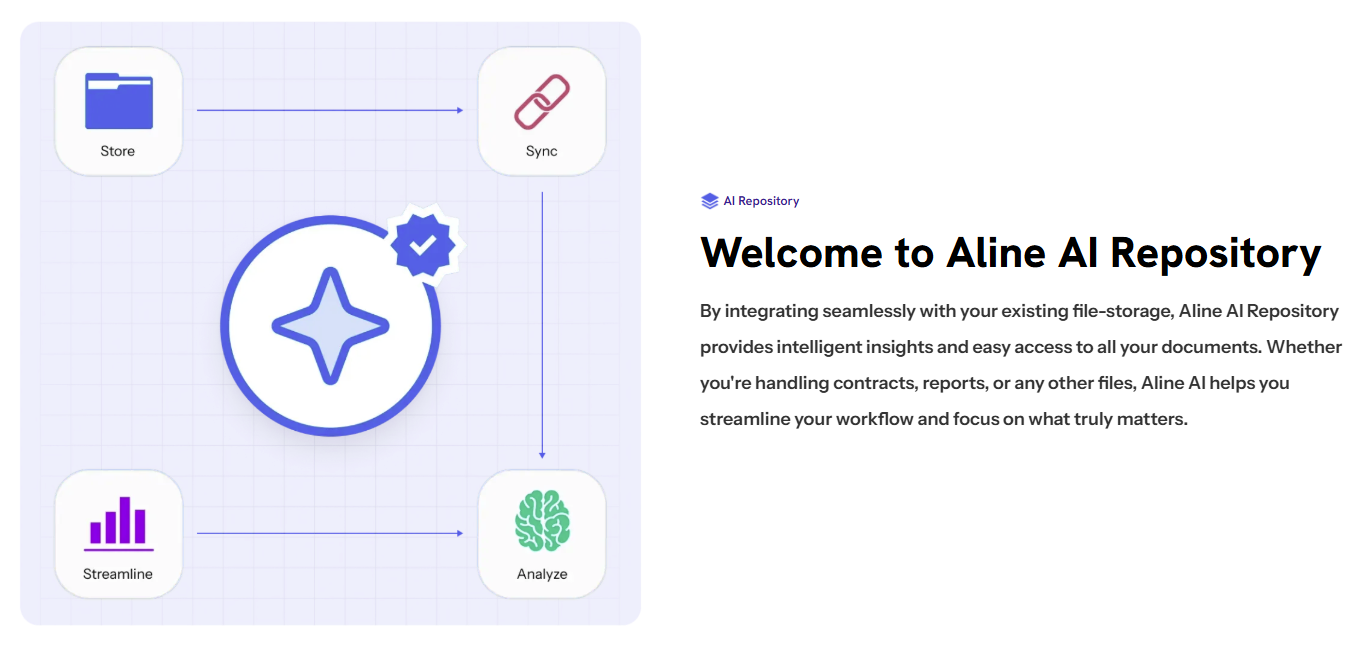
Aline's AI repository connects with Google Drive, Box, Dropbox, SharePoint, and local storage, automatically extracting key contract terms, dates, obligations, and parent-child relationships in amendments and addenda.
You can then search specific clauses, export contract data to Excel, set AI reminders for renewals and expiry dates, and generate custom reports across 1 to 10,000+ agreements.
The repository is only one part of the platform. Aline also supports the full contract lifecycle, covering drafting, redlining, AI analysis, approvals, signatures, and post-signature obligation management.
It follows a multi-modal approach that runs 5+ AI models, including ChatGPT, Gemini, Claude, and others, in parallel. Every response is cross-checked using semantic scoring before it's applied to your contracts. This helps reduce single-model hallucination risk while keeping drafting and contract review aligned with your organization's playbooks.
Aline also includes Agentic Legal Intake to help you manage legal requests from start to finish. Whether a request comes through Slack or email, the AI captures the details, identifies the document type, counterparty, value, and other key information, then selects the right workflow or creates one if needed.
It routes approvals, keeps an audit trail of every step, and hands the request to a reviewer whenever human judgment is required, helping you cut first-pass review time by 60-90%.
See how Appodeal used Aline to automate its contract register and simplify contract management with a single in-house legal professional.
Despite the platform's broad feature set, implementation typically happens within a week, with most teams becoming fully operational in 3-4 days.
From our clients:
You should sell this to every law firm, every top 100. It's worth its weight in gold and saving me tons of time. Having it all in one place just makes everything so easy.
Marshall Murphy, Hogan Lovells

We needed more than e-signature. We needed a repository that ensures reps only have access to the right contracts, without wasting time categorizing and filing agreements after they are signed.
Mark Kindred, Sales at Offerd
Can I stick with a contract repository instead of paying for a full CLM that I won't use to its full potential?
A contract repository works well if your biggest challenge is organizing signed agreements, finding information quickly, and keeping track of renewals and obligations. If your contracts are still being drafted, negotiated, approved, and signed across multiple disconnected tools, a repository alone may only solve part of the problem.
Aline includes both an AI-powered repository and a complete contract lifecycle management (CLM) platform. You can start by centralizing your existing agreements and later use the same platform for drafting, AI review, approvals, e-signatures, reporting, and post-signature obligation management. That means you don't have to replace your repository as your legal operations become more mature.
Can I trust the AI to extract contract data accurately for compliance and audits?
Yes. Aline automatically extracts key metadata, clauses, dates, obligations, and relationships between parent agreements and amendments, transforming contracts from static documents into structured information you can work with.
To improve reliability, Aline cross-validates recommendations across multiple leading AI models. Legal teams can also review extracted information, maintain audit trails, and verify AI-generated outputs before they're used in business decisions, providing an added control for compliance-sensitive workflows.
Will migrating my contracts affect my existing folder structure and user permissions?
Migration is often one of the biggest concerns when introducing a new repository. Aline connects directly with existing storage platforms such as Google Drive, SharePoint, Dropbox, Box, and local storage, allowing you to centralize contract intelligence without forcing you to rebuild your document storage from scratch.
The platform provides role-based access controls, so users only see the contracts they're authorized to access. This lets you adopt AI-powered search, reporting, and contract management while maintaining the security and permission structures your organization already relies on.
Book a demo to see how Aline can replace your fragmented contract-execution tools with a single platform that delivers 5-10× ROI within 3-6 months.
Ironclad is a contract management system suitable for teams that handle a steady flow of agreements and want a cleaner way to manage reviews, approvals, and signatures.
This tool helps legal professionals cut down on manual processes by giving them clear workflows, organized intake, and a dashboard that shows how every contract is progressing.

Many companies rely on it for sales agreements and vendor contract management because it keeps details easy to track and reduces back-and-forth.
Ironclad also sends automated renewal alerts and gives you visibility into supplier commitments, obligations, cost, and potential risks across your contract portfolio.
Ironclad doesn't publish pricing publicly. Market benchmarks suggest that most small- to mid-market buyers pay between $40,000-$80,000 annually, with implementation typically costing an additional $10,000-$25,000.
Immediate team-wide adoption. Most organizations should plan time for onboarding and user training during the initial rollout.
PandaDoc leans into simplicity, giving teams an easy way to create, edit, send, and track digital contracts without a heavy setup. It's often used by sales and operations teams that want a quicker approach to building proposals, vendor agreements, and individual contracts.
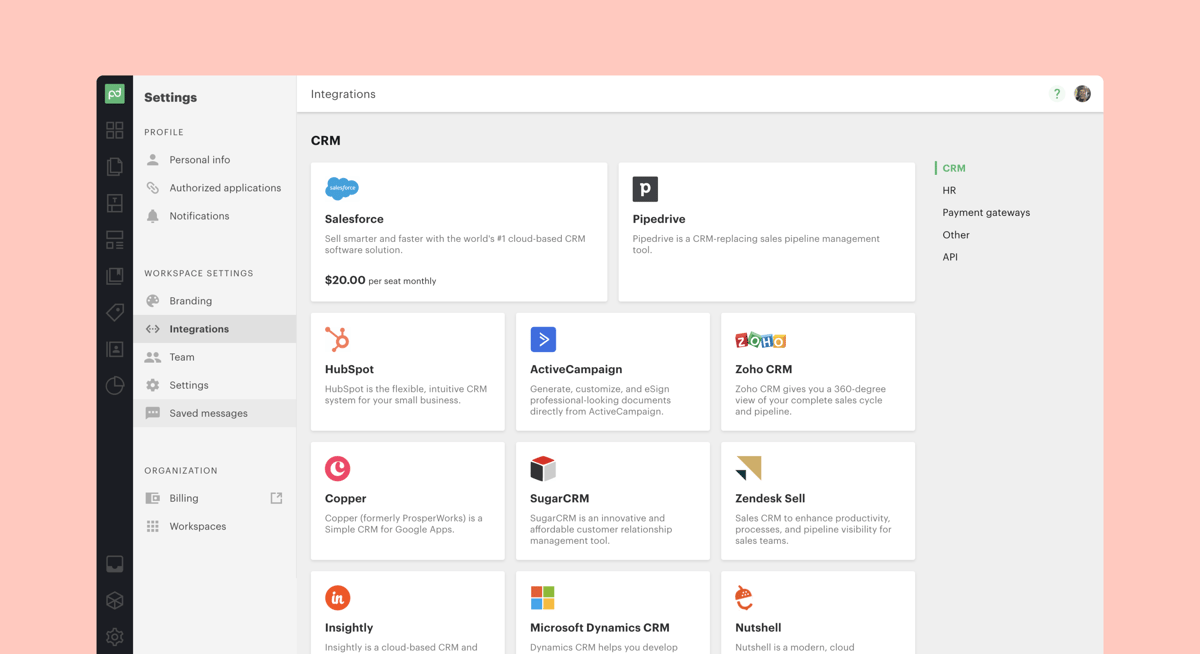
Essentially, the platform keeps everything in one place, helps maintain version control, and cuts a good amount of manual work out of the contract drafting process.
Plus, it includes templates, clause libraries, and real-time editing tools that make collaboration feel straightforward.
PandaDoc provides a free plan with limited functionality. Its starting price is $35/seat (for monthly billing) or $19/seat (for annual billing).
A consistently proactive post-purchase experience, with clear support ownership, timely issue escalation, and easy renewal management, despite access to a dedicated customer success manager.
ContractWorks is built for organizations that want contract management software that stays simple, organized, and predictable.
Many teams turn to it when their existing contracts are scattered across folders or outdated systems, and they need a cleaner way to bring everything together.

The platform gives you a structured space to store contracts, prepare new agreements, and move documents through reviews without relying on long email threads or manual follow-ups.
It also brings helpful clarity to obligations and compliance activity. This simple feature makes it easier to stay ahead of renewals, responsibilities, and the details that support ongoing operations.
ContractWorks offers custom pricing based on your organization's requirements. Third-party estimates place the starting price at $600 per year for unlimited users, 2,500 documents, and 5 eSignature licenses.
Additional implementation guidance for first-time CLM teams, as training materials don't suffice for faster adoption.
DocuSign CLM is often chosen by teams that already rely on DocuSign for electronic signatures and want to bring more order to everything that happens before and after a document gets signed.
HR teams, procurement groups, and legal departments use it to build structured processes around high-volume agreements and keep sensitive information under clear access controls.
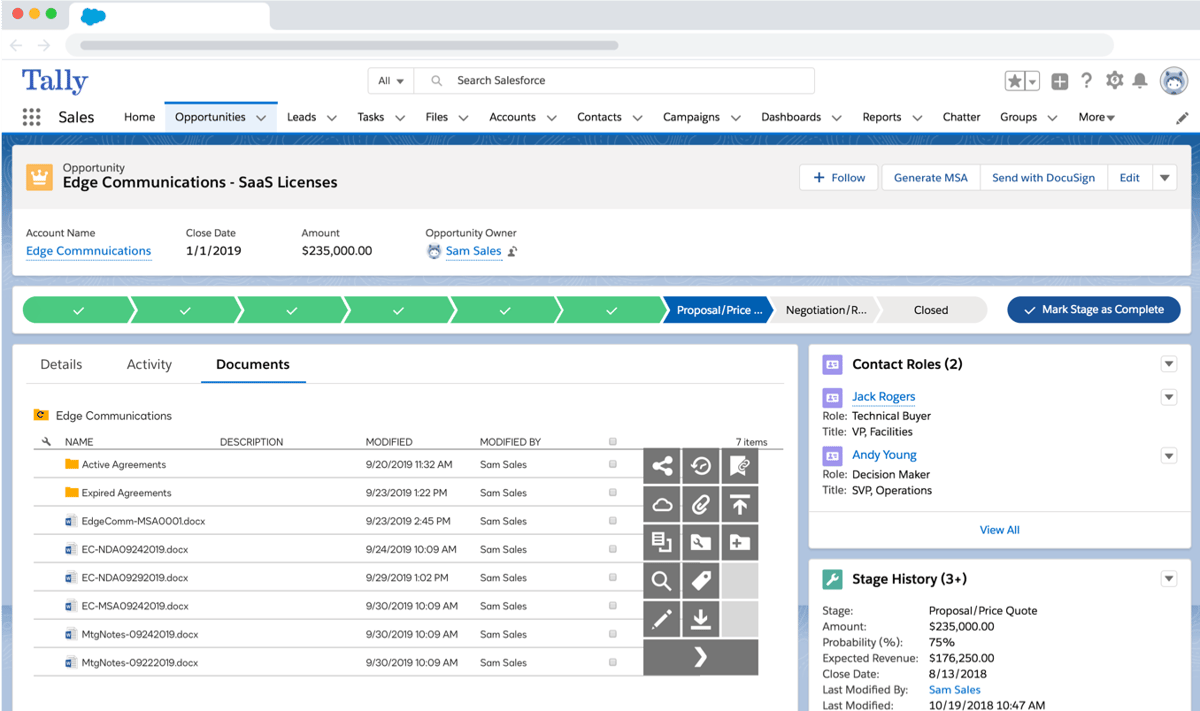
The tool focuses on reducing compliance risk, organizing contract data, and helping growing companies put a dependable system in place for everyday contract work.
It's especially useful for organizations that have outgrown manual processes and need something more formal to stay on top of contract reviews, approvals, and completed records.
DocuSign CLM uses a custom pricing model. Based on third-party procurement data, small deployments (10-25 users) typically cost between $20,000 and $60,000 per year. Enterprise deployments often exceed $500,000 per year, depending on user count, integrations, contract volume, and support requirements.
Time to configure workflows, templates, and attribute mapping before the platform is fully operational.
LinkSquares is a good option for companies that want an enterprise contract management solution that stays fast even as contract volume increases.
Many teams adopt it when manual filing systems stop working, and they need a cloud-based contract repository that keeps everything organized without extra busywork.
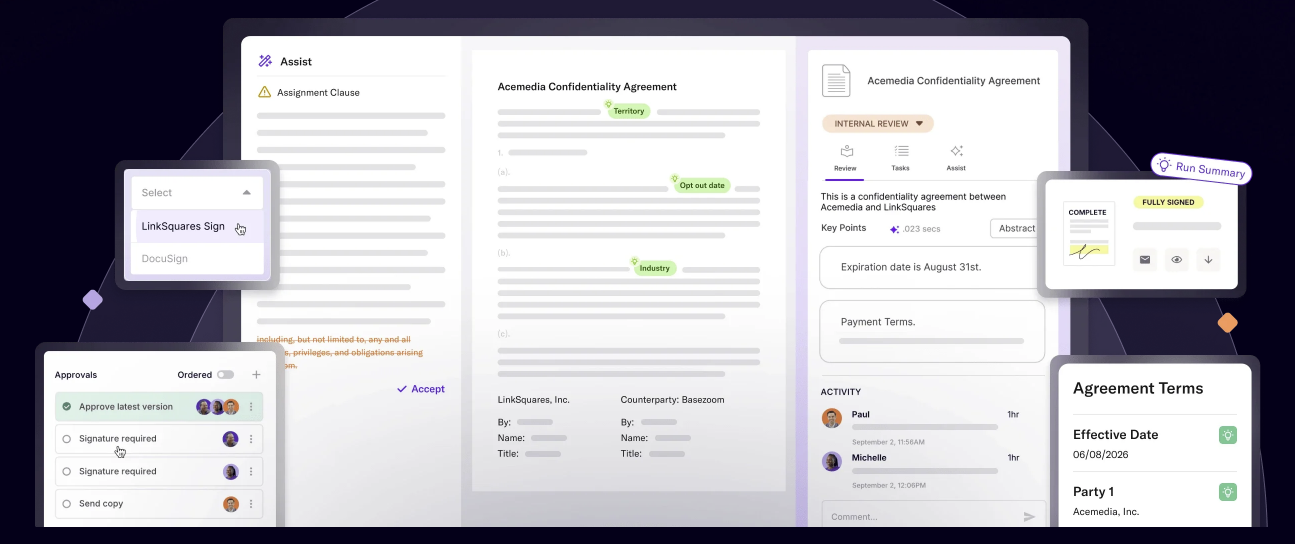
Linksquares focuses heavily on post-signature clarity. Once contracts are uploaded, it pulls out key terms, renewal dates, and financial details so teams can monitor obligations and spot areas of potential financial exposure.
That's why it's commonly used by finance and legal groups that care about clean reporting, smooth contract execution, and a reliable way to stay ahead of contract renewals.
LinkSquares offers custom pricing. Third-party data shows a median annual contract value of approximately $31,000. The number varies based on users, modules, and implementation requirements.
Data cleanup and contract organization before implementation, particularly when migrating large volumes of legacy agreements into a centralized repository.
Agiloft is a contract management suite known for being highly customizable, which makes it a popular choice for teams that want contract workflows tailored to the way their organization already operates.
Companies use it to build structured processes for creating, reviewing, and approving contracts, especially when negotiations involve several departments or require detailed handoffs.
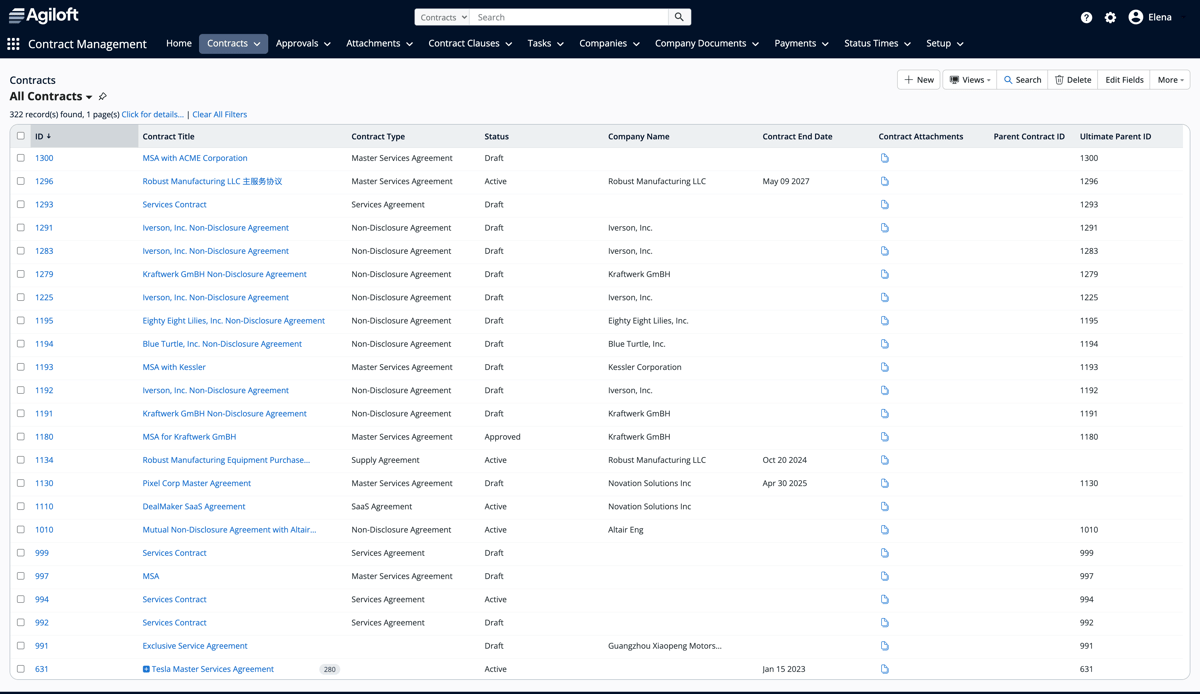
The platform focuses on effective contract management at scale by giving teams clear visibility into obligations, automated alerts for key dates, and tools that help prevent missed renewals that could lead to lost revenue.
Hence, it's frequently adopted by businesses with long sales cycles or complex internal routing needs.
Agiloft offers custom pricing across its Essentials, Advanced, and Premium plans. Third-party estimates customers pay an average of approximately $68,000 per year, with pricing plans starting around $6,000 annually.
Specialized rollout and customization support, as more advanced configurations may require experienced administrators or implementation partners.
Whether you're evaluating Aline or another platform, every solution in this comparison provides a contract repository. The difference is in what comes with it.

As you compare these platforms, the right choice comes down to what you expect your repository to do. If your priority is simply storing contracts, several of these tools can meet that need.
But as your contract volume grows, you'll likely need more than a searchable document library. You'll need to answer questions about obligations, clauses, renewal dates, payment terms, and contract performance without manually reviewing hundreds or thousands of agreements.
Aline is built to remove that trade-off. You can start by centralizing your contracts in a single repository and continue using the same platform as your needs expand, rather than introducing separate tools for drafting, approvals, reporting, or AI-powered contract analysis. That gives your legal and business teams a single source of truth throughout the entire contract lifecycle.
Also, unlike many enterprise CLM platforms, adopting Aline doesn't require lengthy deployments, dedicated administrators, or extensive configuration. You can connect your existing contract storage, onboard your team without relying on IT or legal operations specialists, and start realizing value without a months-long implementation project.
Hear from our customers:
I don't need additional headcount despite having more deal flow, because the tool allows me to just be that much more effective.
Mike Mullane, General Counsel at Breas

With Aline, I can hop on a call, make the fix myself, and move on. The platform is clean, intuitive, and our users pick it up right away.
Christina Varela, Paralegal at Jushi Holdings

Ready to move beyond basic contract storage? Start your free trial to see how Aline helps you organize, search, and manage contracts without the implementation complexity of traditional CLM platforms.
It keeps all your contract information in one organized place, making it easier to store documents, search past agreements, and stay on top of notice periods or upcoming deadlines.
A repository focuses on organized storage and quick access, while full contract management tools layer on automated workflows, drafting, reviews, and features that support smarter contract management.
Yes. Most platforms track contract terms, renewal dates, and obligations, which helps teams reduce operational risk and stay aligned with regulatory compliance requirements.
They can. Moving away from a manual contract setup cuts down on repetitive tasks, speeds up reviews, and reduces time spent searching through old folders or emails.
Pricing usually depends on user count, storage needs, automation features, and how much contract management your team wants to handle inside the platform.











